rivalcfg: configuring SteelSeries gaming mice on Linux, macOS and Windows
CLI tool and Python library to configure SteelSeries gaming mice
At a glance
- What is it?
- rivalcfg is a Python library and command line tool that configures SteelSeries gaming mice by talking to their HID interface, built entirely by reverse engineering and not approved by the vendor. Its real strength is the device handler model, which is why it also does buttons, DPI presets, lighting and sleep timers rather than just colours.
- Who is it for?
- Adopt rivalcfg if you own a supported SteelSeries mouse and want settings that the vendor's own software does not expose on your platform, or you want those settings scripted in a dotfiles repository. Do not adopt it for a device the support list does not cover, and read the unofficial status before you do, since the project states plainly that it is unsupported by SteelSeries.
- Can I use it commercially?
- Yes. WTFPL is a permissive licence: you can use, modify and sell software built on it, as long as you keep its copyright and licence notices.
- Is it still maintained?
- Yes. The repository last received commits 32 days ago.
- What is it written in?
- Mainly Python, according to GitHub's language statistics.
Answers come from the project's GitHub data, last synced on November 7, 2026, and from our analysis. They are not legal advice.
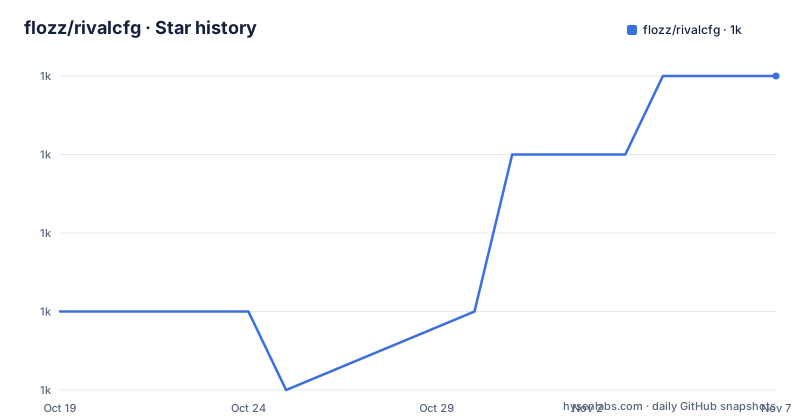
Star history
- flozz/rivalcfg1,013 ★ · +3
| Repository | 2026-10-19 | 2026-11-07 |
|---|---|---|
| flozz/rivalcfg | 1k | 1k |
3 Stars in the last 19 days, measured from the daily GitHub snapshot. Compare with other projects
Editorial analysis
A reverse-engineered HID client, and what that means for the vendor relationship
rivalcfg is a Python library and a CLI utility program that configures SteelSeries gaming mice on Linux, macOS and Windows, with the README adding that it probably works on BSD too, but is not tested there. The homepage is rivalcfg.flozz.org, the licence is WTFPL, and the primary language is Python.
The README states its standing in a way that is worth reading before anything else. It is an unofficial software, made by reverse engineering devices, and it is not supported nor approved by SteelSeries. That is not a legal footnote, it is the design constraint that explains the entire project. There is no vendor SDK being wrapped, and no vendor firmware protocol being implemented as documented. The project works out the HID reports a given mouse accepts by experimenting with the hardware, and it publishes what it finds.
The consequence for a user is concrete and mostly positive. Because the tool speaks to the device rather than to a vendor daemon, there is nothing to install from SteelSeries, no background service, and no account. The device is configured directly over USB HID. The consequence for support is equally concrete: if a firmware update changes a report layout, there is no vendor to file a bug with, and the fix has to come from the reverse engineering itself or from users who did the same work on a newer revision.
The project also carries its history in the open. The author says he first created the program to configure his own Rival 100 and the original Rival mice, and that support for other Rival devices was added by contributors. The stated aim now is to support any SteelSeries gaming mice, naming the Rival, Sensei, Aerox and Prime families. Each device in the changelog is listed with its USB product ID in hexadecimal, for example 1038:172b, 1038:183C and 1038:182C, which is the concrete form that reverse engineering takes here: a table of identifiers, and a driver for each one.
The audience is a Linux user in particular, The tool is deliberately cross-platform, and the repository carries a standalone build for each of the three.
The device handler model, which is where the engineering is
The changelog is a good place to read the architecture, because the commit categories are consistently scoped: feat(device), feat(handler), feat(debug), fix(mouse), fix(color_helpers), misc(standalone), misc(tests), docs(device). The handlers are the abstraction that makes adding a device cheap.
A handler is the piece that knows how to set one particular kind of thing on a device. The changelog shows the handler set growing over time: a range_choice handler, a multidpi_range_choice handler, and a multidpi_range_choice_xy handler, the last of which appears in a hotfix. The names describe what they do. A range_choice handler sets a value that has discrete options. A multidpi handler deals with the multi-DPI preset structure that modern gaming mice have, where the mouse holds several DPI presets and the active one can be switched. The xy variant deals with the case where two independent dimensions have to be set together.
That structure is what makes the tool more than a colour setter. A modern SteelSeries mouse has DPI presets, button bindings, a polling rate, a sleep timer, a sensor mode, and per-profile lighting. Writing that as a monolithic script per device would mean rewriting the same logic for every new model. Splitting it into handlers means a new mouse gets a device profile that wires up existing handlers, and the interesting work, the multi-DPI preset logic that has caused real bugs, is written once.
The bug history shows the value. v4.16.1 was a hotfix for the Rival 3 Wireless Gen 2 becoming unusable after setting sensitivity, and for the multidpi_range_choice_xy handler with an xxyy mapping using fewer presets than the max preset count. A device that is unusable after a settings change is the worst failure mode for a configuration tool, because the user has a broken mouse and no obvious way back. v4.16.0 also fixed DPI values for specific sensors, the TrueMove Air, TrueMove Core and PixArt PMW3326, each with its own list of affected device IDs. That is the signature of the reverse engineering problem: the same mouse behaves differently depending on which sensor variant shipped inside it.
The colour validation bug in the unreleased changes, fixed in color_helpers, is the same story in miniature.
hidapi, udev rules, and the platform differences that matter
The dependency list is short and the length of it is the design: pyproject.toml declares a single runtime dependency, hidapi>=0.14.0, and requires-python is >=3.10. Everything else is dev tooling, Sphinx for the docs, black, flake8, nox, pytest, validate-pyproject.
hidapi is a cross-platform wrapper for the native HID APIs, which is the right choice for a tool that has to work on Linux, macOS and Windows without maintaining three implementations. The project itself is built on top of it, and the entry point is registered in pyproject.toml as rivalcfg = "rivalcfg.__main__:main", so the console script name is the same as the package.
The Linux-specific friction is the udev rules. The repository topics include udev-rules, and the changelog shows the project actively suppressing a udev rules warning in DRY debug mode. On Linux, writing to a HID device generally requires a udev rule granting the logged-in user permission, and without it the tool can read the device but not change it. The README links a requirements page and an install-from-sources page in the documentation for exactly this kind of setup, and the project publishes the rules rather than asking you to work them out.
Two other platform notes are visible. The debug facilities are configurable through the environment rather than through flags, which suits a tool that people run under a wrapper: setting the RIVALCFG_DEBUG_PRINT_HID_REPORT env var prints the bytes sent to and received from the device, and a DRY debug mode exists in which the udev rules warning is not printed, which is what a test run wants. And there is a separate ssdb/ directory with a script for extracting the product_id of wireless mice dongles, which means the wireless receivers are handled as a distinct case, since a wireless mouse identifies itself through its dongle rather than directly.
The release list also shows the packaging choices were modernised in v4.16.0, moving from setup.py and setuptools to pyproject.toml and flit, with the build backend pinned to flit_core >=3.2,<4 in the current pyproject.toml. Python 3.14 support was added in the same release, and Python 3.9 support was removed as a breaking change.
Installing it: PyPI, standalone builds, and the device list
The project publishes a PyPI package named rivalcfg, and the pyproject.toml registers the rivalcfg console script. The project URLs point to a download page at rivalcfg.flozz.org/download.html and to the documentation at flozz.github.io/rivalcfg, and the README links the same pages as a Download Rivalcfg link, a Supported and unsupported devices page and a News and announces page.
There is no pip command in the README itself, so rather than invent one, the honest route is the download page, which is where the README points for the installer for your platform, and the PyPI package for the library form.
Three distribution forms are described in the changelog for v4.17.0. A standalone build for Linux, a standalone build for Windows and a standalone build for macOS were all added, and the unreleased changes note that the Windows standalone build is now using Python 3.14. A standalone build is what you want if you do not want to manage a Python environment at all, and it matters for a Linux user on a distribution where the packaged Python version does not match the >=3.10 requirement.
The devices documentation is the page to read before anything else. The project maintains a list of supported and unsupported devices, and per-device documentation is in the documentation tree under a devices section. Since every device in the changelog is identified by its USB product ID, the supported list is a concrete table rather than a marketing claim, and the unsupported list tells you what to expect if your mouse is not in it.
The documentation also carries a requirements page, an install-from-sources page and a FAQ, and the README asks people to read the contributing page before opening issues or pull requests, which is a small thing that says the project has a working relationship with its contributors rather than a support queue.
What the tool cannot do, and the risk of firmware moving underneath it
There is a set of limits here that no amount of care on the user's side removes, and it is better to name them than to discover them with a mouse in your hand.
The first is coverage. The tool only supports the devices listed, and it supports specific features of those devices. The changelog is honest about partial support, with v4.14.0 adding partial support of the Aerox 9 Wireless WOW Edition. A mouse that is not in the table does not get configured by this tool, and a mouse in the table might support lighting and DPI but not buttons. The Prime+ entry in v4.17.0 is described as initial support, and v4.15.0 added button support for the Prime mouse with separate documentation updates for the Prime Wireless and Prime Mini button schema, which is the vocabulary of a feature that arrived in stages.
The second is the reverse engineering itself. Because the project is not working from a published protocol, every device profile is a hypothesis about how the hardware behaves, confirmed by experimentation. That hypothesis can be wrong in a way that only shows up later. The hotfix in v4.16.1 for a wireless mouse becoming unusable after a settings change is the clearest example in the changelog of a case where the tool wrote something the device did not interpret as intended, with the consequence that the user's mouse stopped working properly. A project with no vendor relationship has no way to issue a firmware fix; the remedy is a code change and a new release, which means the user is on the version where the bug existed.
The third is the wireless case, where the dongle is a separate device with its own product ID and the ssdb script exists specifically to handle that identification, which is a hint at how much of the complexity is in the wireless path.
The fourth is the platform reality. Using rivalcfg means choosing a reverse-engineered path over a vendor tool, which may do things this tool does not, and may keep working when a firmware update breaks this tool. Where no vendor tool is available, the case for rivalcfg is strongest and the risk is lowest.
rivalcfg against the official SteelSeries software
The comparison has a different shape on each platform, and the interesting one is Linux.
rivalcfg is a command line tool and library that talks to the HID endpoint directly, which gives it three properties. It is scriptable, so a DPI or lighting configuration can live in a dotfiles repository and be reapplied to a new machine. It has no background process. And its device knowledge comes from the hardware rather than from a product catalogue.
The cost of that approach is the reverse engineering risk described above.
On Linux the alternative to rivalcfg is not a vendor tool but the mouse's own on-board memory, the profile buttons and the default settings, and the option of not configuring the device at all. If you have bought a mouse with eleven buttons, per-profile lighting and multiple DPI presets, and you use Linux, rivalcfg is essentially the only way to reach those settings. That is the case the project exists for, and the one where a user has the least to lose by choosing the unofficial path.
A third option, worth naming for the scripting use case, is to write your own HID calls. The device profiles and handler structure are in the repository, and hidapi is a thin library, so a small script that sets one value is a feasible weekend project. What you would lose is the accumulated per-device knowledge, the sensor-specific DPI corrections, and the multi-DPI preset logic that the changelog shows has taken several releases to get right. For a single device and a single setting, writing your own is reasonable. For a fleet or a hobby where the tool is already written, it is not.
Editorial conclusion
Adopt rivalcfg if you own a supported SteelSeries mouse and want settings that the vendor's own software does not expose on your platform, or you want those settings scripted in a dotfiles repository. Do not adopt it for a device the support list does not cover, and read the unofficial status before you do, since the project states plainly that it is unsupported by SteelSeries. Verify first that your exact model and product ID appear in the supported devices list, that you have the udev rules in place on Linux, and that you are on a release that includes the features you need, since Python 3.9 support was dropped in v4.16.0 and the current line requires 3.10 or newer.
Frequently asked questions
Is rivalcfg official SteelSeries software?
No. The README states plainly that it is unofficial software, made by reverse engineering devices, and is neither supported nor approved by SteelSeries. It talks to the mouse over HID directly rather than through a vendor daemon.
Which SteelSeries mice does rivalcfg support?
The project aims to support any SteelSeries gaming mice, naming the Rival, Sensei, Aerox and Prime families, and it maintains a page of supported and unsupported devices. Every device in the changelog is listed by its USB product ID, for example the Rival 5 at 1038:183C and the Prime+ at 1038:182C.
What does rivalcfg need to run on Linux?
The project needs a udev rule so that your user can write to the mouse, which is why the repository carries udev rules and the documentation has a requirements page. The Python package itself declares a single runtime dependency, hidapi>=0.14.0, and requires Python 3.10 or newer.
Can I script rivalcfg to apply mouse settings automatically?
Yes. rivalcfg is both a CLI utility and a Python library, with the console script registered as rivalcfg and the source under the rivalcfg package. The project also ships standalone builds for Linux, macOS and Windows if you would rather not manage a Python environment.
Official sources
Add this badge to your README
If you maintain this project, the badge below links readers to this analysis and shows its maintenance status from the daily GitHub snapshot. Paste the markdown into your README; add ?metric=license or ?metric=stars to the image URL for a different field.

[](https://hysenlabs.com/projects/flozz-rivalcfg)Star history chart for your README
[](https://hysenlabs.com/projects/flozz-rivalcfg)Was this useful?