InfiniteTalk: unlimited-length talking video driven by audio
Unlimited-length talking video generation that supports image-to-video and video-to-video generation
At a glance
- What is it?
- MeiGen-AI's InfiniteTalk re-dubs existing video or animates a still image from an audio track, holding lip, head and body motion in sync over long clips.
- Who is it for?
- InfiniteTalk is a research release with a working inference path rather than a paper alone. It earns its place if your source material is already video and you need a new voice track over it, or if you have a single portrait and an audio file.
- Can I use it commercially?
- Yes. Apache-2.0 is a permissive licence: you can use, modify and sell software built on it, as long as you keep its copyright and licence notices.
- Is it still maintained?
- Yes. The repository last received commits 154 days ago.
- What is it written in?
- Mainly Python, according to GitHub's language statistics.
Answers come from the project's GitHub data, last synced on October 23, 2026, and from our analysis. They are not legal advice.
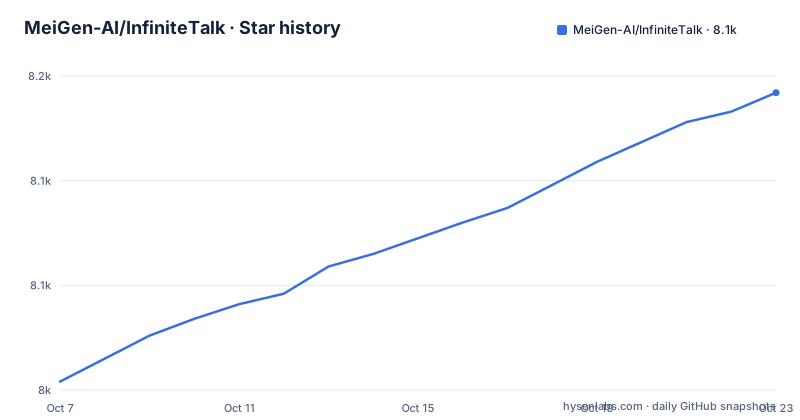
Star history
- MeiGen-AI/InfiniteTalk8,142 ★ · +138
| Repository | 2026-10-07 | 2026-10-23 |
|---|---|---|
| MeiGen-AI/InfiniteTalk | 8k | 8.1k |
138 Stars in the last 16 days, measured from the daily GitHub snapshot. Compare with other projects
Editorial analysis
Two entry points: dubbing a clip or animating a still
InfiniteTalk accepts audio as the driving signal and produces video from it, and the repository commits to both directions of that. Feed it a video plus a track and you get a dubbed video. Feed it a single image plus the same kind of track and you get an animated clip. The README names the first mode sparse-frame video dubbing and the second image-audio-to-video, and the repository description claims unlimited-length output for both.
That length claim is the part worth pausing on. Unlimited-length video generation is not a feature you switch on, it is a consequence of how the model is built, and the README describes the mechanism only at a high level: rather than regenerating every frame from scratch, the model works on sparse frames and interpolates the rest. The repository carries no releases, so the only technical detail available sits in the technique report linked from the README, arXiv 2508.14033.
The practical split matters for planning work. Video-to-video dubbing leaves the framing, camera move and scene composition alone and rewrites the performance. Image-to-video invents the performance and everything around it. The first is the narrower, more controllable problem, and it is the one the README leads with.
Sparse-frame dubbing and the claim over MultiTalk
The feature list is short and specific, which is a good sign for a research repository. Sparse-frame video dubbing synchronizes lips, head movement, body posture and facial expressions against the audio, rather than working on the mouth alone. Infinite-length generation is listed as supporting unlimited video duration. Stability is described as reducing hand and body distortion compared with MultiTalk, and lip accuracy as superior to MultiTalk's.
MultiTalk is the useful yardstick here because it is the same group's earlier talking-video model, so the comparison is not against a distant competitor. Two claims sit side by side: fewer hand and body artifacts, and better lip sync. Neither is quantified in the README, and no benchmark numbers appear anywhere in it. What you get instead is a demo gallery of video-to-video and image-to-video clips.
Head and body synchronization is the quietly more ambitious half of that list. Lip sync is a narrow problem with well-known evaluation tooling. Head pose and shoulder movement following speech rhythm is what separates a character that is mouthing words from a character performing them, and it is the part of the pipeline most likely to drift over a long clip. Whether it does drift is something the demos suggest rather than something the documentation settles.
Inside the tree: kokoro, wan, and one generate script
The repository is small and flat at the top level, which makes it easy to read. `generate_infinitetalk.py` sits at the root next to `app.py`, the Gradio demo, and the dependency list is a single `requirements.txt`. Two directories carry most of the weight: `wan/`, which holds the video backbone, and `kokoro/`, which is a text to speech project and suggests the repository bundles a voice synthesis path alongside generation.
The `examples/` directory is where the input shapes are documented by example rather than by prose. `single_example_video.json` and `single_example_image.json` cover the two single-input modes, and `multi_example_image.json` plus the `multi/` folder cover a multi-segment case. There are no notebooks in the tree, so the JSON configs are effectively the interface documentation.
pip install -r requirements.txtThe dependency list is ordinary PyTorch video work rather than anything exotic: `diffusers>=0.31.0`, `transformers>=4.49.0`, `imageio-ffmpeg`, `decord` and `moviepy==1.0.3` for decoding, `opencv-python` for frames, `xfuser>=0.4.1` for the multi-device path, and `optimum-quanto==0.2.6` for quantization. Two entries are worth noting because they constrain installs: `numpy>=1.23.5,<2` and the exact `moviepy` pin. There is no lockfile and no environment recipe, so a missing `decord` or `moviepy` wheel for your Python version is yours to resolve.
The todo list is the honest speed roadmap
The README carries a todo list with checkboxes, and reading it tells you more about the project's current state than the feature prose does. Done: the technique report, inference, checkpoints, multi-GPU inference, Gradio, ComfyUI, low VRAM operation, and two acceleration items, TeaCache and int8 quantization. Not done: LCM distillation and sparse attention.
This is a genuinely useful piece of engineering communication. TeaCache trades compute for reuse of cached features across similar frames, which suits video with slow change. int8 quantization cuts memory, which matters on consumer cards. Both are done. The remaining two items, step-count reduction through distillation and a sparse attention mechanism, are the ones that would change throughput most, and neither is in the tree.
The last push was on 2026-05-22 and the repository is not archived, so nothing here reads as abandoned. The knowledge in your head about which knobs exist is more current than most changelogs: `xfuser` for multi-GPU is a dependency you can rely on, `optimum-quanto` is what the int8 path is built on, and the two unchecked acceleration boxes tell you where the project itself thinks the headroom is.
ComfyUI and Wan2GP are the practical doors in
Rather than only publishing a script, the project points at two community integrations, and for most people these are the realistic entry points. The ComfyUI support comes from `kijai`'s `ComfyUI-WanVideoWrapper`, and there is also a `comfyui` branch in this repository itself. Wan2GP integrates InfiniteTalk with an explicit low VRAM focus and adds video editing options plus other models including MMAudio support and Qwen Image Edit.
That matters because the direct Python route is not small. Getting `diffusers`, `decord`, `xfuser` and `moviepy` to agree with each other and with your CUDA build is real work, and the ComfyUI path hands you a node graph that somebody else has already resolved. The node route also makes A/B comparison cheap, which matters when the README's own comparison points are about lip accuracy and hand stability rather than a headline benchmark.
The weights are published on Hugging Face rather than in the repository, and the project page is hosted separately at `meigen-ai.github.io/InfiniteTalk/`. The README links both but does not spell out an install sequence of its own, so treat those two destinations as part of setup rather than optional reading.
How InfiniteTalk sits against the group's LongCat releases
The most recent news items on this README are not about InfiniteTalk at all. The May 21, 2026 entry announces LongCat-Video-Avatar-1.5 and the December 16, 2025 entry announces LongCat-Video-Avatar, both with code hosted under the `meituan-longcat` organization rather than `MeiGen-AI`. InfiniteTalk's own release line stops at August 19, 2025, when the technique report, weights, code, Gradio demo and ComfyUI branch all went out together.
So the group is iterating elsewhere, and the README functions as a directory for related work. The LongCat-Video-Avatar-1.5 notes are still informative as direction of travel: Whisper-Large replaces Wav2Vec2 for more accurate lip synchronization, inference is distilled to 8 steps, and the model generalizes to stylized subjects such as anime and animals. Single-stream and multi-stream audio inputs are called out in both entries, which lines up with the `multi_example_image.json` shape shipped here.
If you are choosing between them, the distinction is scope. InfiniteTalk is the sparse-frame dubbing framework with published weights and a Gradio demo. LongCat-Video-Avatar is the newer unified character-animation line with its own repository and project page. The InfiniteTalk README is where the sparse-frame design is described, and that design is the reason to reach for this one first.
Editorial conclusion
InfiniteTalk is a research release with a working inference path rather than a paper alone. It earns its place if your source material is already video and you need a new voice track over it, or if you have a single portrait and an audio file. The sparse-frame design is what makes long output plausible, and the ComfyUI branch plus the kijai wrapper mean you can drive it without touching Python. Start from `examples/single_example_video.json`, move to the ComfyUI workflow once the dependencies in `requirements.txt` are satisfied, and read the todo list before you plan around inference speed, since TeaCache and int8 are done while LCM distillation and sparse attention are not.
Frequently asked questions
What is infinite talk?
In this repository, InfiniteTalk is MeiGen-AI's talking video generation model. Given an audio track it either re-dubs an input video or animates a still image, synchronizing lips, head movement, body posture and facial expressions rather than the mouth alone. The model is released under Apache-2.0 with weights on Hugging Face and a technique report on arXiv.
How to use infinite talk?
The repository ships `generate_infinitetalk.py` at its root, `app.py` for the Gradio demo, and JSON inputs under `examples/`, starting with `single_example_video.json` and `single_example_image.json`. Dependencies come from `requirements.txt`, which pins `numpy` below 2.0 and `moviepy==1.0.3`. The `comfyui` branch and the kijai ComfyUI-WanVideoWrapper are alternatives to running the script.
How can I lipsync an image to audio?
That is the image-audio-to-video mode. `examples/single_example_image.json` holds an image plus audio input, and `multi_example_image.json` covers the multi-input variant under the `multi/` directory. For a pre-existing video rather than a still, the same model re-dubs the clip instead, which is the mode the README calls sparse-frame video dubbing.
Official sources
Add this badge to your README
If you maintain this project, the badge below links readers to this analysis and shows its maintenance status from the daily GitHub snapshot. Paste the markdown into your README; add ?metric=license or ?metric=stars to the image URL for a different field.

[](https://hysenlabs.com/projects/meigen-ai-infinitetalk)Star history chart for your README
[](https://hysenlabs.com/projects/meigen-ai-infinitetalk)Was this useful?