The argument for a dataset framework is the box in the middle, not the format list
Dataset Management Framework, a Python library and a CLI tool to build, analyze and manage Computer Vision datasets.
At a glance
- What is it?
- A Python library and command line tool for reading, converting and analysing computer vision datasets. The interesting feature is not that it reads fourteen formats, it is that it can merge two of them into one and then tell you what went wrong.
- Who is it for?
- Two things to know about the scope. The format list is the visible feature and the framework model is the actual one: any conversion you do by hand is a script you maintain, and a converter that can go in both directions lets you stop doing that.
- Can I use it commercially?
- Yes. MIT is a permissive licence: you can use, modify and sell software built on it, as long as you keep its copyright and licence notices.
- Is it still maintained?
- Yes. The repository received new commits within the last day.
- What is it written in?
- Mainly Python, according to GitHub's language statistics.
Answers come from the project's GitHub data, last synced on November 22, 2026, and from our analysis. They are not legal advice.
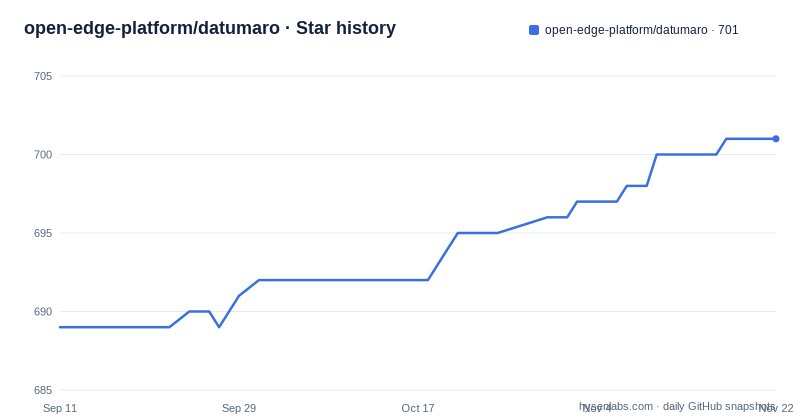
Star history
- open-edge-platform/datumaro701 ★ · +12
| Repository | 2026-09-11 | 2026-11-22 |
|---|---|---|
| open-edge-platform/datumaro | 689 | 701 |
12 Stars in the last 72 days, measured from the daily GitHub snapshot. Compare with other projects
Editorial analysis
The diagram is the pitch, and it is not a format list
The readme opens with a diagram rather than a feature list, and the diagram is the argument:
VOC dataset                                  ---> Annotation tool
     +                                     /
COCO dataset -----> Datumaro ---> dataset ------> Model training
     +                                     \
CVAT annotations                             ---> Publication, statistics etc.
Read it carefully and the position becomes clear. Several dataset formats go in on the left. One canonical dataset comes out of the middle. And everything downstream of it, an annotation tool, model training, publication, statistics, consumes that one form rather than a specific vendor's layout.
That middle box is the whole product. The format list is what makes people arrive, and the canonical form is what makes it useful. The difference is the difference between a converter and a framework, and it is the difference between a script you wrote once and a library you keep depending on.
The diagram also tells you what this is not for. It sits between your data and your tooling, not between you and a cloud service. There is no account, no storage and no cost line. That is why a project from an edge-computing organisation with a copyleft-free licence and a large fork count still makes sense as a dependency: it is infrastructure, and infrastructure has to be inspectable.
Fourteen formats, and the detail that tells you it has been used
The supported formats are listed with the specific task variants each one covers, and that parenthetical detail is the useful part rather than the count.
There is a small image classification set, two face datasets where the interesting part is not classification at all but person re-identification and facial landmarks. There are driving datasets, one of which is listed with segmentation, detection and raw three-dimensional point clouds, which is a good sign about how deep the format support goes rather than how wide.
There is a detection format listed with five task types including action classification and person layout. There is a segmentation format listed with instance, semantic and panoptic variants. And there is a real-time detection format whose listing is terse, which is honest: everyone uses it, nobody says much about it, and the annotations are boxes and masks.
The pattern to notice is that task variants are listed per format rather than one flat list of names. A converter that claims to read a format but only handles its classification subset is a converter that will silently drop your polygons, and listing the variants is how you find out before you have thrown away a labelling budget.
The readme also points to a separate page for other formats and their documentation, which is the right structure: the fourteen here are the ones with first-class support, and pretending the list is exhaustive would be worse than admitting it is not.
Filtering by criteria that are hard to express in a format
The dataset-building section is where a converter stops being a converter, and the filter examples are chosen well enough to show what that means.
You can remove polygons of a given class. You can remove every image that has no annotation of a specific class. You can remove occluded annotations. You can keep only vertically-oriented images, which is a filter no dataset format expresses and which you would otherwise write yourself.
That last one is the category. A dataset format describes how to store labels; it does not describe the decisions a team makes about which labels to keep. Removing small bounding boxes is another: a box of four pixels is noise, and no format has a field for it.
The consequence is that the filters are a query language in practice. You can express dataset transformations in terms of what you want rather than in terms of how the file is laid out, which means the same filter applies whether the source is one format or another.
The merge capability sits next to this for the same reason. Combining two datasets that use different label vocabularies is the operation that breaks naive converters, because the label names do not correspond. Doing it well requires a step where you say what maps onto what, and that step is a decision rather than a conversion.
Splitting that does not quietly destroy your class balance
The split section is the one to read if you train models, and it is more careful than most tooling.
Random splitting is offered. So is task-specific splitting driven by the annotations themselves, and the stated goal is that the initial label and attribute distributions are preserved across the splits.
That goal is the whole point. A random split of an imbalanced dataset produces a test set that may not contain a class you care about, and you will discover this when your evaluation metric looks wonderful and your production model does not. Splitting by annotation is the fix, and it is not a ten-line function.
The three cases named are instructive. Classification splits on labels. Detection splits on boxes, which is a coarser criterion than classification because you are distributing images that contain an object. Re-identification splits on labels with an explicit extra constraint: the same identity must not appear in both training and test.
That last one is the detail I would put in a requirements document for any vision pipeline. Person re-identification datasets are notorious for this: if the same person appears in train and test, the model learns to recognise that person rather than to re-identify people, and your test score is measuring memorisation. A splitter that knows to prevent it is worth the install on its own.
Quality checking, including checking against your own model
The validation section has four items and the third one is the reason to install this.
Simple error checking and per-task annotation validation are the expected features. Comparing one dataset against another is useful for merging safely, because a merge is exactly the operation where you lose track of what you had.
The third is comparison against model inference. You run your model over the dataset and compare its output to the labels, and the places where they disagree are either label errors or model errors and you cannot tell which from the diff alone.
That is the tool most dataset libraries skip, and skipping it is rational: it requires the model to be runnable in the same environment as the data tooling, it is slow, and it is only useful if you already have a model. But it is also the fastest way to find the subset of your data where your model is unreliable, which is the thing you most need to know and can least easily get.
The fourth item, merging and comparing multiple datasets, is what makes the merge operation safe rather than hopeful.
Alongside validation there is a statistics section: image mean and standard deviation, and annotation statistics. Those are the numbers you need before you choose a normalisation, and computing them yourself from a format-specific script is one of those chores that is quick once and painful every time.
A mature repository, and the files that tell you so
The repository layout is the evidence for maturity more than the star count is, and there are five files here that most projects this size do not have.
A third-party notices file and a notice file are two separate artefacts, which means the licensing position has been thought about rather than copied from a template. A pre-commit configuration and a secret-scanning ignore file mean the repository runs automated checks on its own commits, and the second of those exists because the project has needed to say which paths a scanner should not report.
A pull request template and a dedicated security document are the other two. The security document is the one worth having: for a library that will run inside someone's training pipeline, knowing where to report a vulnerability is as important as the fix.
Beyond governance there are three directories that describe the engineering. A source tree, a test directory, and a documentation folder, plus a notebooks directory and a Rust directory.
That last one is the interesting outlier. A mature Python dataset library with a Rust directory means at least one performance-critical path was rewritten in a systems language while the API stayed Python. For a library where every operation touches disk and large arrays, that is the plausible place to put the effort, and it is also the kind of detail worth checking against your actual workload before you assume the fast path applies to the operation you care about.
The packaging files are the conventional modern set: a Python package configuration, a test configuration, a manifest, a lock file and a changelog. The single-file script at the repository root is there so you can invoke the tool without installing it, which is a small convenience that tells you the author thought about the first thirty seconds of a new user's experience.
Editorial conclusion
Two things to know about the scope. The format list is the visible feature and the framework model is the actual one: any conversion you do by hand is a script you maintain, and a converter that can go in both directions lets you stop doing that. The second is the quality-checking half, which is the part most dataset tooling skips. Comparing a dataset against your model's own output is a genuinely useful debugging tool that almost nobody builds, because it requires the model to be runnable in the same environment as the data tooling. If you are only converting between two formats, this is overkill. If you have three datasets and a model whose predictions do not match your labels, it is the tool the problem needs.
Frequently asked questions
What is Datumaro?
A Python library and command line tool for building, transforming and analysing computer vision datasets. It reads and writes fourteen annotation formats with their task variants, converts between them in any direction, and is designed around a canonical intermediate representation so downstream tooling consumes one dataset format rather than a vendor-specific one.
Which dataset formats does it support?
About fourteen, listed with the specific task variants each covers rather than just the name: classification, detection, segmentation including instance, semantic and panoptic, action classification, person layout, person re-identification, facial landmarks, and raw three-dimensional point clouds. The per-format task listing is the useful part, because it tells you whether the subset you need is actually supported.
Can it merge and filter datasets?
Yes, and the filters are the interesting part. You can remove polygons of a class, drop images with no annotation of a given class, remove occluded annotations, keep only vertically-oriented images, or drop small bounding boxes. Those are dataset decisions rather than format operations, which is what separates this from a plain converter.
How does it split a dataset into training, validation and test?
Either randomly, or task-specific from the annotations, with the goal of preserving the initial label and attribute distributions. Classification splits on labels, detection on boxes, and re-identification on labels with an explicit constraint that the same identity cannot appear in both training and test, which would otherwise make the test score measure memorisation.
Can it check my dataset for errors?
Yes, four ways: simple error checking, annotation validation based on the task type, merging and comparing multiple datasets, and comparison against your own model's inference output. That last one finds the images where your model disagrees with your labels, which is the fastest way to locate unreliable data.
Is it still being maintained?
The release history shows several tagged versions across the most recent months with fixes rather than features, which is the pattern of a mature library. The repository carries a changelog, a security document, a pull request template, a third-party notices file and automated pre-commit checks, which together are a better signal than release cadence alone.
Official sources
Add this badge to your README
If you maintain this project, the badge below links readers to this analysis and shows its maintenance status from the daily GitHub snapshot. Paste the markdown into your README; add ?metric=license or ?metric=stars to the image URL for a different field.

[](https://hysenlabs.com/projects/open-edge-platform-datumaro)Star history chart for your README
[](https://hysenlabs.com/projects/open-edge-platform-datumaro)Was this useful?