cheetah: offline recognition, online licensing
On-device streaming speech-to-text engine powered by deep learning
At a glance
- What is it?
- Picovoice's Cheetah is an on-device streaming speech-to-text engine published to seven package registries under seven different names, with a C library and eleven platform demos at the root rather than a Python package. The claim that matters is the tension at the top of the page: all voice processing runs locally, and yet you need internet connectivity to validate your access key against the vendor's license servers. The accuracy and efficiency claims link out to benchmark pages rather than carrying numbers.
- Who is it for?
- Use this if you need speech recognition with the audio never leaving the device, since that part of the privacy claim is genuine. Skip it if your deployment target is air-gapped, because key validation is documented as requiring internet connectivity and no offline path is described.
- Can I use it commercially?
- Yes. Apache-2.0 is a permissive licence: you can use, modify and sell software built on it, as long as you keep its copyright and licence notices.
- Is it still maintained?
- Yes. The repository last received commits 3 days ago.
- What is it written in?
- Mainly Python, according to GitHub's language statistics.
Answers come from the project's GitHub data, last synced on November 15, 2026, and from our analysis. They are not legal advice.
Star history
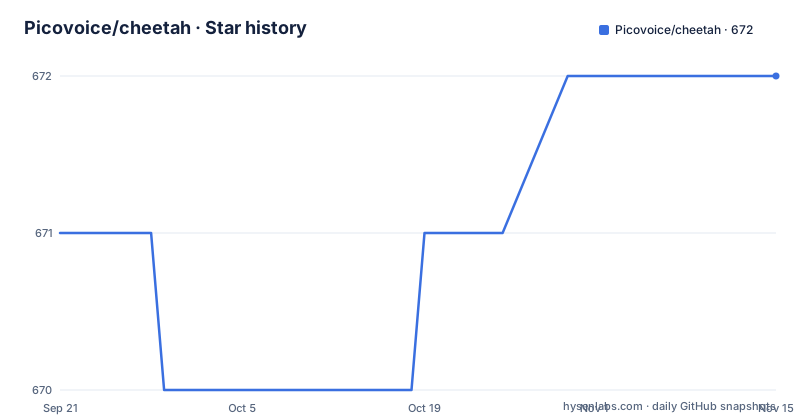
- Picovoice/cheetah672 ★ · +1
| Repository | 2026-09-21 | 2026-11-15 |
|---|---|---|
| Picovoice/cheetah | 671 | 672 |
1 Stars in the last 55 days, measured from the daily GitHub snapshot. Compare with other projects
Editorial analysis
Recognition runs fully offline, and the licence check does not
The first of the three headline properties is privacy, stated as all voice processing runs locally. The access key section then qualifies it in a way that is easy to skim.
You need internet connectivity to validate your access key against the vendor's license servers, and the page says so explicitly, even though the voice recognition is running one hundred percent offline.
That is a real constraint rather than a rhetorical one. A deployment on an air-gapped network cannot use Cheetah as documented, because the key cannot be validated. The page does not say what happens in that case or whether a validated key is cached.
The same key does two jobs. It is the authentication and authorisation token for deploying any of this vendor's SDKs, and it is also what verifies that usage is inside your account limits. Current usage and limits are visible on a console profile, and changing them means contacting a sales team.
So the privacy claim and the licensing model pull in opposite directions, and both are stated on the same page without either being qualified by the other. That combination is the single most important thing to know before deploying this.
Three releases, three tag shapes
The release list has three entries and the tag naming is not consistent across them.
The newest is prefixed v with a single number component. The one before it has no prefix and carries a patch component. The one before that is prefixed v with a single number component again.
So within three releases of the same 4.x line there are three different tag conventions. The release titles also disagree with the tags in one case: the tag without the prefix is named with a prefix, so the human-facing name and the tag differ on that one release.
The cadence underneath is steadier than the naming. Three releases across seven months, ending with one published on the current date.
The recorded state matches that: the last recorded push is also 2026-10-02, a few hours before the newest release was stamped. The repository is not archived, the default branch is master, the licence is Apache-2.0, and the primary language recorded is Python.
The Python demo is an installed package and the other ten are directories
There are eleven demo directories in the repository, and one of them works completely differently from the rest.
Ten of them are source trees you open in an editor or build yourself. The iOS demo needs a package manager install and then a generated workspace opened in Xcode. The Android demo is opened as an Android project. The Flutter demo needs a language code passed to a preparation script and then a deploy command. The C and React Native demos need a build or an environment script before anything runs.
The Python demo is two commands and no repository at all:
pip3 install pvcheetahdemo
cheetah_demo_mic --access_key ${ACCESS_KEY}
The demo package is published to the package index under its own name and installs a console script. Nothing is built and nothing is edited, and the only thing you supply is the key as an argument.
That inversion is a reasonable choice for a Python audience, since installing a wheel and running an entry point is the shortest possible path to hearing the engine work. It also means the Python demo is the one that cannot be used to inspect how the bindings are wired.
The C demo needs submodules, and its CMake project lives inside the demo
The C demo is the only one that documents a real build, and it has two requirements that are easy to miss.
The first is the clone flag. Both the SSH and the HTTPS clone commands carry a flag that pulls in submodules, and the repository has a submodules file at the root. Omit it and the native libraries are simply not there.
The second is where the build system lives. The source directory passed to the build tool is inside the demo folder, not the repository root. There is no build manifest at the top of the tree.
The build and the run are two commands:
cmake -S demo/c/ -B demo/c/build && cmake --build demo/c/build
./demo/c/build/cheetah_demo_mic -a ${ACCESS_KEY} -m ${MODEL_PATH} -l ${LIBRARY_PATH}
The run takes three arguments and all three are paths or keys the reader has to supply. The key, the path to a native library under the lib directory, and the path to a parameter file, with the default one named in the prose.
That parameter file is worth noticing. It is a model file with the vendor's own extension, it sits inside the shared library directory, and the demo accepts a custom one. So the engine's behaviour is configured by a data file you can point elsewhere, not only by code.
Windows on arm64 is a target and Linux is x86_64 only
The cross-platform claim is a list, and the list is more precise than the claim.
Desktop covers Linux on x86_64, macOS on x86_64 and arm64, and Windows on x86_64 and arm64. Mobile is Android and iOS. The browser row names four engines: Chrome, Safari, Firefox and Edge. And the single-board computer row is Raspberry Pi 3, 4 and 5.
Two things stand out. Linux is the only row with a single architecture, so the other two desktop platforms cover both instruction sets while the most common server platform does not. And Windows on arm64 is a much narrower target than Windows on x86_64, so including it alongside macOS arm64 suggests the native library is built from one portable core rather than per platform.
The Raspberry Pi row is the interesting one for on-device claims, because three generations of the same board are named, which is a specific compatibility statement rather than a generic one.
The two other headline properties link out rather than being asserted. Accuracy and computational efficiency both point at benchmark pages, one of them in a separate repository, rather than to numbers on this page.
Seven registries, and the Python distribution has a different name
The badges at the top of the page are a package index, and reading them together shows the naming problem across seven ecosystems.
The Python distribution carries a vendor prefix in front of the product name. The Flutter package drops the prefix and uses the product name with the platform suffix. The Android and Java artifacts sit under a Java group identifier with the platform in the middle of the artifact name. The Node and web packages use a vendor scope with the product name. The .NET package and the iOS pod use the vendor name and the product name as separate words.
Seven registries, and only the .NET package and the iOS pod share a convention with each other.
The practical consequence is that an integrator maintaining a dependency allow-list across platforms has seven different strings to allow. None of that is unusual in a cross-platform native SDK, and the badge row is at least a complete index in one place.
The one entry that would confuse a reader who searches the product name is the Python one, since typing the product name into the index finds nothing and the prefixed name has to be known in advance.
Six recognition languages, and a demo script whose examples include one that is not among them
The language support section is a short list and a commercial escape hatch.
Recognition supports six languages: English, French, German, Italian, Portuguese and Spanish. Additional languages are described as available for commercial customers on a case-by-case basis.
Now look at the Flutter demo instructions. The preparation script takes a language code, and the examples given map one code to German and another to Korean. Korean is not among the six.
The likeliest reading is that the code selects the demo application's locale rather than a recognition language, since the recognition list is fixed at six and the script's purpose is described as setting up the demo in the language of your choice. But the page does not say that, and a reader who assumes the argument picks the recognition language would conclude the engine speaks Korean.
Running the script with no argument lists the available languages, which is the way to find out. That is the only disambiguation offered, and it costs one command.
The repository root is a C library with bindings, not a Python package
The primary language is recorded as Python and the root looks like a native library. Both are true and neither is the whole story.
The fourteen root entries include a formatting configuration for the C family, a submodules file, a Swift package manifest, and four directories whose names describe a compiled project: bindings, include, lib and resources, plus a scripts directory.
So what is published to the Python index is a wrapper around something that lives in the root, and the seven other language bindings are peers of the C library rather than wrappers around the Python one.
The demos then sit in an eleventh top-level directory, which is why the tree is as wide as it is: eleven platform demonstrations, each with its own build system, sitting beside one shared native core.
The recorded popularity is 670 stars, 77 forks and 2 open issues, with the vendor named as the maintainer and the project described as made in one city by that company.
Editorial conclusion
Use this if you need speech recognition with the audio never leaving the device, since that part of the privacy claim is genuine. Skip it if your deployment target is air-gapped, because key validation is documented as requiring internet connectivity and no offline path is described. Before you deploy, read the language list against your actual requirement, since six are included and the rest are a commercial conversation, and if you are building the C integration, clone with submodules, because the native libraries are not in the repository.
Frequently asked questions
What is Picovoice Cheetah?
An on-device streaming speech-to-text engine. All voice processing runs locally, and it covers Linux, macOS and Windows on the architectures listed, Android and iOS, Chrome, Safari, Firefox and Edge, and Raspberry Pi 3, 4 and 5. The Python distribution is named pvcheetah rather than the product name.
What languages does Cheetah support?
English, French, German, Italian, Portuguese and Spanish. Additional languages are described as available for commercial customers on a case-by-case basis rather than as a self-service option.
Does Cheetah need an internet connection to work?
Not for recognition, and yes for licensing. All voice processing runs locally, but you need internet connectivity to validate your access key against the vendor's license servers even though recognition itself runs fully offline. The page does not describe an offline validation path.
How do I run the Cheetah Python demo?
Install the demo package from the Python index, then run the console script it provides with your access key as an argument. Unlike the other ten demos, which are source directories you build or open in an editor from the repository, the Python demo ships as an installed package with a command.
How do I build the Cheetah C demo?
Clone the repository with the flag that pulls in submodules, then configure and build with the build tool using the demo C directory as the source, not the repository root. Running the resulting binary takes three arguments: your access key, the path to a native library under the lib directory, and the path to a parameter file.
Official sources
Add this badge to your README
If you maintain this project, the badge below links readers to this analysis and shows its maintenance status from the daily GitHub snapshot. Paste the markdown into your README; add ?metric=license or ?metric=stars to the image URL for a different field.

[](https://hysenlabs.com/projects/picovoice-cheetah)Star history chart for your README
[](https://hysenlabs.com/projects/picovoice-cheetah)Was this useful?