vectorbt runs a parameter grid, not a single strategy
The backtesting engine that gives you an unfair advantage. Run thousands of trading ideas before others finish one.
At a glance
- What is it?
- vectorbt is a Python backtesting engine that broadcasts strategy parameters into NumPy arrays so a whole grid runs in one call. This looks at what the community edition actually covers, what it hands to the paid PRO tier, and what a printed profit number leaves out.
- Who is it for?
- Use the community edition when you are sweeping a parameter grid on a signal or holding model and can live without limit orders, borrowed capital, or futures contract multipliers. Walk away if any of those three matter, or if your environment cannot take pandas 3.x and numpy 2.4.6.
- Can I use it commercially?
- Check first. The repository uses a licence we do not classify automatically, so read its LICENSE file before any commercial use.
- Is it still maintained?
- Yes. The repository last received commits 4 days ago.
- What is it written in?
- Mainly Python, according to GitHub's language statistics.
Answers come from the project's GitHub data, last synced on November 15, 2026, and from our analysis. They are not legal advice.
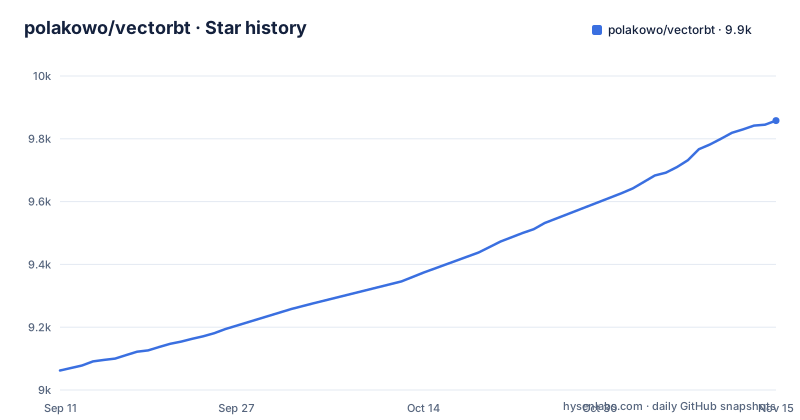
Star history
- polakowo/vectorbt9,858 ★ · +796
| Repository | 2026-09-11 | 2026-11-15 |
|---|---|---|
| polakowo/vectorbt | 9.1k | 9.9k |
796 Stars in the last 65 days, measured from the daily GitHub snapshot. Compare with other projects
Editorial analysis
One grid of parameters replaces a loop over strategies
vectorbt does not evaluate one strategy at a time. Parameters are broadcast into NumPy arrays, indicators run across every combination at once, and the resulting portfolio objects are indexed by parameter and symbol. The window sweep pairs every value in `np.arange(2, 101)` with every other value, so roughly 4,900 backtests come out of a single `vbt.MA.run_combs(price, window=windows, r=2, short_names=["fast", "slow"])` call, and one configuration is then pulled out positionally with `pf[(10, 20, "ETH-USD")].stats()`. Broadcasting is also what makes the groupby in the random-strategies example possible, where expectancy is averaged per signal count and per symbol before the scatter plot draws it.
Numba compiles on first call, the Rust engine skips the wait
The dependency list pins numba>=0.66 next to numpy>=2.4.6 and pandas>=3.0.3,<4.0. Numba compiles the indicator and simulation functions on first call, so the earliest run in a session pays a compilation cost that later runs do not, which hurts most in short scripts and notebooks. The optional Rust engine is a separate wheel, vectorbt-rust==1.2.0, declared under the rust extra and pinned to an exact version rather than a floor, so the engine wheel has to match the library release you installed. The feature list describes that path as precompiled speed without JIT overhead, which is the whole argument for running the two side by side.
Four install commands and four different dependency bills
The core install brings in the whole numeric and plotting stack:
pip install -U vectorbtThe three extras are separate installs, not flags on that first one. `pip install -U "vectorbt[rust]"` adds only the engine wheel. `pip install -U "vectorbt[full]"` adds eleven packages: TA-Lib, yfinance>=0.2.22, python-binance, ccxt>=4.0.14, alpaca-py, ray>=1.4.1, ta, pandas-ta-classic, python-telegram-bot>=13.4, quantstats>=0.0.37, and kaleido>=1.
pip install -U "vectorbt[full,rust]"Decide which of those you actually need before installing, because moving from core to full later pulls four exchange clients, a Telegram bot library, Ray, and TA-Lib into one environment, and each of them can move transitive version floors underneath your pandas and numpy.
The first four lines produce a number, not a verdict
The shortest complete run fetches data, extracts the close, and builds a portfolio:
import vectorbt as vbt

data = vbt.YFData.download("BTC-USD")
price = data.get("Close")

pf = vbt.Portfolio.from_holding(price, init_cash=100)
print(pf.total_profit())19501.10906763755Adding a rule means two indicator runs and a pair of crossover calls: `vbt.MA.run(price, 10)` against `vbt.MA.run(price, 50)`, then `ma_crossed_above` for entries and `ma_crossed_below` for exits handed to `from_signals`. Both start from 100 dollars. Printed profit figures like these are not net of any cost modelling unless you set fees and slippage yourself.
Limit orders, borrowed capital, and futures multipliers are not in the open build
The community edition builds portfolios from signals, from holdings, and from random signals. Limit orders, use leverage, and contract multipliers for futures are named in the README as VectorBT PRO features, and the PRO callout right after the dual-SMA example links straight to those three pages. If your edge depends on a resting limit order filling at a price you chose, or on a margin position, no Portfolio argument in the open code expresses either, and the failure is quiet: the backtest finishes and prints a number that never saw the order type you actually trade. Portfolio optimization, pattern recognition, and event projections sit in the same paid list, alongside parallelization.
The grid returns a value for every cell, including impossible ones
Because the window sweep pairs each value in `np.arange(2, 101)` with every other one, a fast window of 90 gets measured against a slow window of 3 and comes back with a result. A heatmap over that grid therefore shows invalid and valid cells on the same axis, and `.stats()` for any single cell looks exactly as complete as a good one. Choosing parameters on the same bars you then report is a modeling decision the library will not make for you, and a grid that always returns a value will never announce that it tried something nonsensical.
The Docker image freezes extras at build time
The Dockerfile starts from quay.io/jupyter/scipy-notebook:python-3.11, copies the tree into /tmp/vectorbt, installs it with pip, and deletes the copy. Extras are chosen at build time through `ARG VBT_EXTRAS=""`, which is expanded into the extras marker of the pip command, so an image is built with an extra or built without it, not both. The image exposes 8888 and starts start-notebook.py bound to 0.0.0.0, which is harmless on a laptop and worth a second thought before it runs anywhere reachable. Two consequences follow: the container ships Python 3.11 even though the package allows up to 3.14, and anything you forgot in the build argument is simply absent at runtime.
Yahoo data and notebook dependencies live outside the core install
`vbt.YFData.download` talks to a Yahoo endpoint, and the examples fetch several symbols. yfinance is not a core dependency; it arrives with the full extra at yfinance>=0.2.22, and the same extra carries ccxt>=4.0.14, alpaca-py, and python-binance for other venues. The examples directory holds notebooks for pairs trading, walk-forward optimization, Telegram signals, and stop signals, plus a requirements-backtrader.txt, so a notebook can ask for packages the library install never gave you. Repository metadata reports the license as NOASSERTION while pyproject.toml points at LICENSE.md, so read that file before you rely on the machine-readable answer.
Editorial conclusion
Use the community edition when you are sweeping a parameter grid on a signal or holding model and can live without limit orders, borrowed capital, or futures contract multipliers. Walk away if any of those three matter, or if your environment cannot take pandas 3.x and numpy 2.4.6. Before trusting a printed total, check the vectorbt-rust pin against the release you installed, and reread the fees and sizing arguments that produced it.
Frequently asked questions
What is VectorBT?
It is a Python library for backtesting and analyzing trading strategies at scale, built on pandas, NumPy, and Numba. Rather than looping over bars one strategy at a time, it packs thousands of configurations into NumPy arrays and runs them together, with an optional Rust engine for precompiled speed. The default branch is master and the project site is https://vectorbt.dev.
how to install vectorbt
The community edition installs with `pip install -U vectorbt`. Each optional piece is a separate extras install: `pip install -U "vectorbt[rust]"` for the Rust engine, `pip install -U "vectorbt[full]"` for TA-Lib, yfinance, ccxt, alpaca-py, Ray, and quantstats, or `pip install -U "vectorbt[full,rust]"` for everything at once. Package metadata requires Python >=3.11,<3.15 and numpy>=2.4.6.
how to use vectorbt
Load a price series with `vbt.YFData.download`, take one column with `data.get("Close")`, and hand it to `vbt.Portfolio.from_holding` or `vbt.Portfolio.from_signals`. Indicators such as `vbt.MA.run` expand into every parameter pair you pass, `vbt.Portfolio.from_random_signals` takes an array of signal counts, and indexing the result with something like `pf[(10, 20, "ETH-USD")]` drills back into a single cell of the grid.
is vectorbt pro worth it
That is a budget question, but the feature boundary is concrete. The paid edition is described as extending the library with parallelization, additional data integrations, portfolio optimization, pattern recognition, event projections, limit orders, leverage, and over 100 other features, with new features added weekly. Those order types and the parallel runs are not in the open build, so a strategy that needs them has no community fallback.
What are some good backtesting libraries for Python?
vectorbt classifies itself under Science/Research, Financial and Insurance Industry, and Developers, with a Development Status of 5 - Production/Stable, and pulls scipy, scikit-learn, matplotlib, plotly>=4.12.0, and numba>=0.66 alongside the core stack. Its distinguishing trait is grid-scale experimentation rather than a single backtest per script. Limit orders are not part of the open build.
Official sources
Add this badge to your README
If you maintain this project, the badge below links readers to this analysis and shows its maintenance status from the daily GitHub snapshot. Paste the markdown into your README; add ?metric=license or ?metric=stars to the image URL for a different field.

[](https://hysenlabs.com/projects/polakowo-vectorbt)Star history chart for your README
[](https://hysenlabs.com/projects/polakowo-vectorbt)Was this useful?