Obsidian Thino Review: Free Daily Note Capture With Paid Extensions
A quick capture plugin for Obsidian, all data from your notes.
At a glance
- What is it?
- Thino adds a focused capture interface to Obsidian and writes entries into diary notes, with core capture and listing available for free. Version 2 and later are proprietary, and sync, AI, multiple sources, global capture, and several views require a paid license.
- Who is it for?
- Obsidian users who want fast, diary-based capture should test Thino's free core workflow first. Users who require multiple note sources, global capture, Thino Web sync, AI features, the local HTTP API, or unrestricted live-preview support should verify the paid feature boundary before adoption.
- Can I use it commercially?
- Check first. The repository uses a licence we do not classify automatically, so read its LICENSE file before any commercial use.
- Is it still maintained?
- Yes. The repository last received commits 43 days ago.
- What is it written in?
- GitHub does not report a main language for this repository.
Answers come from the project's GitHub data, last synced on November 7, 2026, and from our analysis. They are not legal advice.
Star history
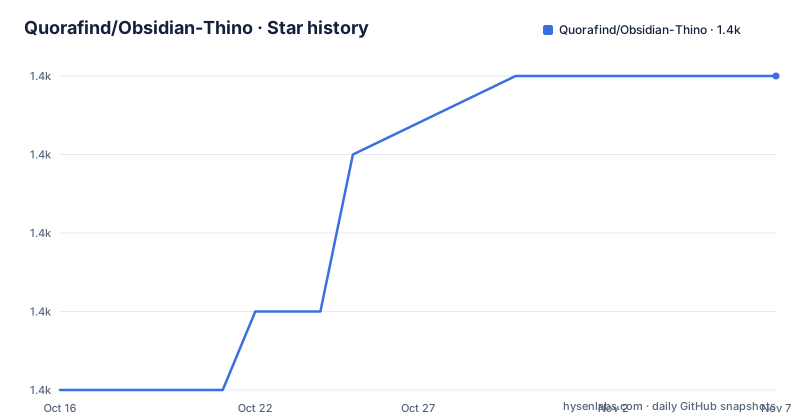
- Quorafind/Obsidian-Thino1,370 ★ · +4
| Repository | 2026-10-16 | 2026-11-07 |
|---|---|---|
| Quorafind/Obsidian-Thino | 1.4k | 1.4k |
4 Stars in the last 22 days, measured from the daily GitHub snapshot. Compare with other projects
Editorial analysis
What Thino Solves Inside Obsidian
Thino addresses a narrow capture problem: recording a thought in Obsidian without navigating to the correct daily note and editing the file directly. It is aimed at users who already keep diary notes and want a separate interface for entering short observations. The captured content remains derived from the user's notes rather than becoming the only copy in an external database. In the basic configuration, every Thino originates from a diary file.
The plugin supports several interfaces within Obsidian, including Thino Share and Global Editor. Its basic daily-note workflow is available for free. The README also lists Live Preview Editor support in the free version, but marks that support as limited. This distinction matters because "free" does not mean that every editor mode and feature is unrestricted.
Thino targets Obsidian users rather than a general note-taking audience. A user with many established note sources or a requirement for unstructured global capture may need to purchase Pro before the feature set matches that workflow. The README does not document migration from arbitrary existing notes into the basic free mode, so Thino should not be assumed to index a whole vault automatically.
How Thino Parses and Writes Diary Entries
Thino's basic mechanism reads note content and parses it into entries called Thinos. In diary mode, it can inspect content beneath a configured title or read the full text of a diary. The documented parsing format resembles a Markdown list item followed by a time and text, such as `- 19:00 abcd`. A checkbox item beginning with `- [ ] 19:00 cdef` is also recognized.
The write path is similarly tied to note structure. Before normal use, a user must configure the heading under which Thino processes diary-mode content and the heading under which new entries are inserted. Captured content is appended at the end of that configured title or at the end of the full text. The README's basic example shows input being transformed into a Markdown list item containing the current time and the entered text, represented in the documentation as `- 22:15 {your input content}`.
This design keeps the Markdown diary as the source of record. It also makes configuration consequential. If the processing and insertion headings are wrong, capture behavior will not match the user's intended daily-note structure. The README does not describe conflict detection, recovery steps, or rollback for a misplaced insertion, so those behaviors should not be assumed.
Installing Thino and Completing the First Capture
The README directs users to install Thino from the Obsidian Plugin Market or PKMer plugins. The documented market entry uses the identifier `obsidian-memos`, even though version 2.0.0 renamed obsidian-memos to thino. Users should search for `thino` in the Obsidian plugin market as the README recommends.
There is no package-manager command or development build procedure in the README. Installation therefore takes place through the documented plugin listings rather than a command line. The repository contains a compiled plugin for the Obsidian community directory, not the current source code.
Enable Obsidian's Daily Notes core plugin before using the basic diary mode. Then open Thino's settings and configure both required values: the title under which diary content should be processed and the title under which new content should be inserted. The interface does not prescribe the actual heading text, so configuration must match headings already used in the diary.
Open Thino, enter a short piece of text, and click the `noteit` button. According to the README, the plugin should then insert that text into the configured diary file in Markdown list form with a time. The first real verification is therefore visible in the daily note, not merely in Thino's own list view.
Free Capture Versus Paid Thino Features
The free and paid split is concrete rather than a trial-only distinction. The README identifies Daily Notes Mode, Thino Share, and Global Editor as available without a paid license. It also includes Live Preview Editor support in the free column with an asterisk that says support is limited.
The Pro column includes Multi Layout, Daily Progress Bar, Custom Suggester for Live Preview Editor, Random Review, Local Thino Server, Global Capture, and Multiple Thino Sources. The license disclosure separately identifies Thino Web sync, canvas, table, and moments views, the local HTTP API, and AI features as paid capabilities. These lists do not align perfectly, particularly around the Local Thino Server and local HTTP API. Buyers should verify the feature they need against the current product terms rather than assume that each label is interchangeable.
Thino Sync is described as a paid cross-device service. According to the README, data is stored while sync or publish is subscribed, remains stored for one month after subscription expiration, and is deleted immediately after self-cancellation. The service is marked "Not yet available," so it should not be treated as an available adoption criterion.
Network Access, Privacy Boundaries, and Source Availability
Thino is not open source from version 2.0.0 onward. The repository ships the compiled plugin under the Thino Proprietary License, with all rights reserved, while version 1 remains available under the MIT license through a separate source repository. This distinction is important for engineers who need source inspection, modification rights, or a familiar open-source contribution model. The current repository layout does not provide the application source.
The README states that the plugin contacts remote endpoints for license verification or activation through PKMer. Optional Thino Web sync and configured AI providers are additional network paths. Notes are not sent elsewhere unless sync or AI functionality is explicitly enabled. AI use requires the user to configure their own API keys.
That does not make the plugin fully offline. License activation still involves a remote service, and optional sync or AI introduces further data flows outside the vault. The README does not provide a full network request inventory, endpoint list, retention schedule for AI providers, or offline activation procedure. Users with strict network-control requirements cannot resolve those points from the documentation.
Maintenance Signals and Upgrade Cost
The repository is not archived, and its last push was on 2026-09-25. Releases 3.2.0, 3.2.1, and 3.2.2 were all published on 2026-09-25. These dates show recent repository activity, although release frequency by itself does not establish compatibility with every Obsidian release.
The upgrade path for users is narrower than it would be for a source-distributed Obsidian plugin. The community-directory package is compiled, and the current code is under a custom proprietary license. The README links to `CHANGELOG.md` and `CHANGELOG_ARCHIVE.md`, but it does not document migration procedures, automatic updates, plugin signing, rollback, or the minimum Obsidian version.
License implications should be reviewed directly in the repository's `LICENSE` file and the linked purchasing terms. The README says the core capture and list features remain free, while advanced capabilities require payment. It does not describe redistribution rights, modification rights, offline-use rights, or what happens to paid features after a subscription ends. Those points require direct review of the proprietary terms before embedding Thino in a managed environment.
Where Thino Is the Wrong Tool
Thino is a poor fit when free daily-note capture is the entire requirement and paid features are unacceptable, because that core workflow still depends on heading configuration, compiled code, and PKMer license verification. It is also unsuitable for users who need guaranteed global capture or several note sources in the free edition, since the README assigns both to Pro.
A developer who requires auditable source code should use the open MIT-licensed version 1 or select a source-available plugin. An organization that prohibits proprietary components should make that decision before installation. Likewise, an air-gapped workflow has an unresolved issue because the plugin contacts PKMer for license verification and activation.
Thino should not be selected as a standalone system of record if Markdown diaries are not acceptable as the underlying store. Its basic entries originate from those files, and the optional sync product is not yet available. For teams seeking a conventional self-hosted API without a paid license, Thino does not match the documented feature set because the local HTTP API belongs to Pro.
Editorial conclusion
Obsidian users who want fast, diary-based capture should test Thino's free core workflow first. Users who require multiple note sources, global capture, Thino Web sync, AI features, the local HTTP API, or unrestricted live-preview support should verify the paid feature boundary before adoption. Based on the repository, the first checks are plugin installation through the documented Obsidian market entry, configuration of both diary headings, and confirmation that compiled plugin code and a custom proprietary license fit your review requirements.
Frequently asked questions
How do I install Obsidian Thino?
Install it from the Obsidian Plugin Market or PKMer plugins. The README recommends searching for `thino` in the Obsidian plugin market after the version 2.0.0 rename.
Is Obsidian Thino free or open source?
Core capture and list features are free, but several advanced features require a paid license. Thino has been proprietary and closed source since version 2.0.0; only version 1 source is identified as MIT licensed.
Does Obsidian Thino send my notes to a server?
The README states that notes are not sent elsewhere unless sync or AI features are explicitly enabled. License verification and activation contact PKMer, while enabled sync and configured AI features introduce their respective remote services.
Official sources
Add this badge to your README
If you maintain this project, the badge below links readers to this analysis and shows its maintenance status from the daily GitHub snapshot. Paste the markdown into your README; add ?metric=license or ?metric=stars to the image URL for a different field.

[](https://hysenlabs.com/projects/quorafind-obsidian-thino)Star history chart for your README
[](https://hysenlabs.com/projects/quorafind-obsidian-thino)Was this useful?