ThoughtEcho stores your notes twice and syncs them two ways
Your Personal Inspiration Notebook with AI Power.
At a glance
- What is it?
- ThoughtEcho is a Flutter notebook that keeps everything on the device in SQLite and MMKV, hides sensitive notes behind a fingerprint, and adds a long-memory agent called Thoughter that runs against any OpenAI-compatible provider. Sync is optional and comes in two shapes: LAN transfer and WebDAV backup.
- Who is it for?
- ThoughtEcho fits someone who writes in fragments, wants excerpts and context attached automatically, and would rather keep notes on the device than in an account. It does not fit someone who needs collaborative editing or a server-hosted workspace.
- Can I use it commercially?
- Yes. MIT is a permissive licence: you can use, modify and sell software built on it, as long as you keep its copyright and licence notices.
- Is it still maintained?
- Yes. The repository last received commits 3 days ago.
- What is it written in?
- Mainly Dart, according to GitHub's language statistics.
Answers come from the project's GitHub data, last synced on October 19, 2026, and from our analysis. They are not legal advice.
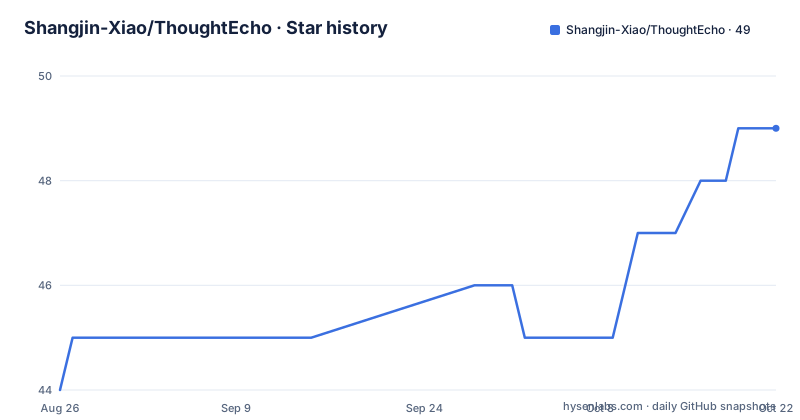
Star history
- Shangjin-Xiao/ThoughtEcho49 ★ · +5
| Repository | 2026-08-26 | 2026-10-19 |
|---|---|---|
| Shangjin-Xiao/ThoughtEcho | 44 | 49 |
5 Stars in the last 54 days, measured from the daily GitHub snapshot. Compare with other projects
Editorial analysis
Local-first, with two storage engines underneath
The storage claim is specific enough to check. The project describes itself as local-first with full data ownership held locally in SQLite and MMKV, and says explicitly that there is no tracking and no forced cloud lock-in. Two engines for two purposes: SQLite is the database, with sqflite on mobile and sqflite_common_ffi on desktop through the SQLite FFI, and it also backs the full-text search behind tags and filtering. MMKV is the high-performance key-value cache, and flutter_secure_storage holds encrypted API keys. Search is local SQLite full-text rather than an index hosted elsewhere, so multi-tag filters and intelligent sorting run on the same database the notes live in. The privacy story also has a hiding layer: sensitive notes can be filed under hidden tags and unlocked with fingerprint, Face ID, or Windows Hello.
Thoughter is an agent with a memory database
The AI half is not a chat panel bolted onto a note editor. Thoughter is described as an agent with tool calling, a dedicated long-term memory database, and cross-session memory that persists between sessions and is described as understanding your writing personality. Tool calling is what separates it from a completion box: the agent can act inside the app rather than only emit text for you to paste. The memory piece is the part that changes how the app feels over time, because what it recalls is stored rather than reconstructed from the current conversation, and corrections demote what it has learned in a way you can inspect. Alongside it sit periodic insights, described as automated weekly and monthly reflection insights plus annual review reports, with a creative rhythm and writing trend analysis behind them.
One protocol, seven provider presets
Provider choice is a configuration detail rather than an architectural commitment. The AI layer is described as an OpenAI-compatible protocol architecture, and the presets named are Ollama, OpenAI, DeepSeek, Gemini, Claude, OpenRouter and SiliconFlow. That list spans a local model on your own machine through an aggregator to the major hosted providers, which is only practical because the app speaks a protocol rather than a vendor SDK. Two consequences follow. A locally hosted model is a first-class option rather than a workaround, so the app can be used with no network call for inference at all. And the API keys live in encrypted storage rather than in a preferences file, since each provider needs a credential and the secure-storage plugin exists for exactly that. Keys are never meant to be committed anywhere.
Sync comes in two shapes and neither is required
Moving data between devices is deliberately split into a fast local path and a slow cloud one. The local path is LocalSend, described as high-speed LAN direct transfer using mDNS discovery and encrypted transfer, with the tech stack table specifying encrypted TLS for the transfer itself. There is no account to create and no server to register with: discovery is on the local network. The cloud path is WebDAV, offered as flexible cloud backup and restore rather than as continuous sync. Media handling is designed for the same two-step model: streaming chunked processing for large files with smart caching, full ZIP import and export, and incremental sync so a second device does not re-transfer everything. A recycle bin sits alongside the WebDAV screen in the settings and storage section, which matters once deletions start syncing.
Notes collect place, weather and hour without being asked
Context sensing is the feature that has no equivalent in a plain markdown editor. When a note is captured, the app can attach geocoding location, weather, and time of day as inspiration context, so a fragment captured on a walk carries where and when it happened without you writing it down. Two supporting features sit on the same path. Quick capture includes a smart clipboard watcher, daily quotes from services such as Hitokoto and ZenQuotes, and AI writing prompts, which is how something gets into the app in the first place. On the other end, the AI card generation feature converts notes into shareable cards with artistic templates, which is the reverse move: taking a private fragment and rendering it as something to post. Drafts auto-save in real time with crash recovery in between, so a thought is not lost between the moment you have it and the moment the editor opens.
Two SQLite bindings because mobile and desktop are not the same
A small detail in the tech stack table explains a real constraint. The local database row reads sqflite for mobile and sqflite_common_ffi for desktop through the SQLite FFI, which means the desktop build loads SQLite through the foreign function interface rather than through the plugin the mobile build uses. That is not redundancy for its own sake; it is the cost of one data model across two very different desktop environments. The rest of the stack follows the same shape of deliberate substitution. Provider and GetIt handle reactive orchestration and dependency injection, flutter_quill provides the rich typography with image, audio and video embeds, and Media 3 dynamic colour tokens sit alongside two handcrafted themes named Paper and Ink and Plain, with specialised reading typography. State management and dependency injection being named together is the Flutter convention rather than a design statement.
Four platform folders, two documented download channels
The repository tree carries android/, ios/, web/ and windows/ directories, and the README language line covers four locales: English, 简体中文, 日本語 and 한국어, with German, Spanish and French described as in progress. An l10n.yaml at the root is the localisation configuration that makes those four translations a build-time concern rather than four hand-edited copies, and matching README files exist for each. The download section is narrower than the tree. For Windows it recommends the Microsoft Store, where it auto-updates, and for Android an APK from the GitHub releases page. So the practical question for a new user is which of the two documented channels serves their platform, and the latest release, version 4.0.0 published on 29 August 2026, is what either channel would serve.
Agent tooling files sit next to the application code
The root of the repository tells you something about how the project is built. Alongside the Flutter directories there is an AGENTS.md, an .agents directory, a .copilot directory, a .jules directory and a .coderabbit.yaml, plus a skills-lock.json that pins whatever those skills depend on. There is also plan.md, PROJECT.md, DESIGN.md and TEST_INFRA.md, which reads like a written record of decisions rather than a set of issue trackers. Testing is split three ways: unit tests under test/, integration tests under integration_test/, and driver-level tests under test_driver/. Documentation lives in docs/ with a user manual, and a separate web guide is published on GitHub Pages. None of this affects how the app behaves, but it does tell you that the repository is maintained with the same agent tooling the app's own features advertise.
Editorial conclusion
ThoughtEcho fits someone who writes in fragments, wants excerpts and context attached automatically, and would rather keep notes on the device than in an account. It does not fit someone who needs collaborative editing or a server-hosted workspace. Before adopting it, check four things: which AI provider you will point it at and what your key handling looks like, whether the LocalSend LAN path suits your network, how much you trust a weekly and monthly reflection report that calls itself an analysis of your thinking patterns, and whether the platform you need is one the download section actually names.
Frequently asked questions
Which platforms can I download ThoughtEcho for?
The download section recommends the Microsoft Store for Windows, where it auto-updates, and an APK from GitHub Releases for Android. The repository also contains ios/ and web/ directories alongside android/ and windows/, but the README download section names only those two channels.
Does ThoughtEcho send my notes to a server?
The project describes itself as local-first, with notes stored locally in SQLite and MMKV, no tracking and no forced cloud lock-in. Moving data between devices is optional and comes in two shapes: LocalSend for LAN direct transfer and WebDAV for cloud backup and restore.
Which languages does ThoughtEcho support?
English, 简体中文, 日本語 and 한국어 are fully supported, with German, Spanish and French described as in progress. The repository ships matching README files in the four finished languages and an l10n.yaml at the root for localisation.
Official sources
Add this badge to your README
If you maintain this project, the badge below links readers to this analysis and shows its maintenance status from the daily GitHub snapshot. Paste the markdown into your README; add ?metric=license or ?metric=stars to the image URL for a different field.

[](https://hysenlabs.com/projects/shangjin-xiao-thoughtecho)Star history chart for your README
[](https://hysenlabs.com/projects/shangjin-xiao-thoughtecho)