vaex: out-of-core DataFrames that never copy the file
Out-of-Core hybrid Apache Arrow/NumPy DataFrame for Python, ML, visualization and exploration of big tabular data at a billion rows per second 🚀
At a glance
- What is it?
- vaex memory-maps HDF5 and Apache Arrow files so statistics, groupby and joins run without loading a table into memory. The design is deliberate and single machine, and the repository's release history says very little about which version you actually get.
- Who is it for?
- Vaex fits a specific shape of work: big files already on disk, exploration and aggregation on one machine, and a preference for lazy evaluation over copying columns into memory. It does not fit a workflow that needs a cluster on day one, and this repository will not tell you which Python versions or which current release you get, since the README states neither and the release list stops at 2018.
- Can I use it commercially?
- Yes. MIT is a permissive licence: you can use, modify and sell software built on it, as long as you keep its copyright and licence notices.
- Is it still maintained?
- Yes. The repository last received commits 9 days ago.
- What is it written in?
- Mainly Python, according to GitHub's language statistics.
Answers come from the project's GitHub data, last synced on November 13, 2026, and from our analysis. They are not legal advice.
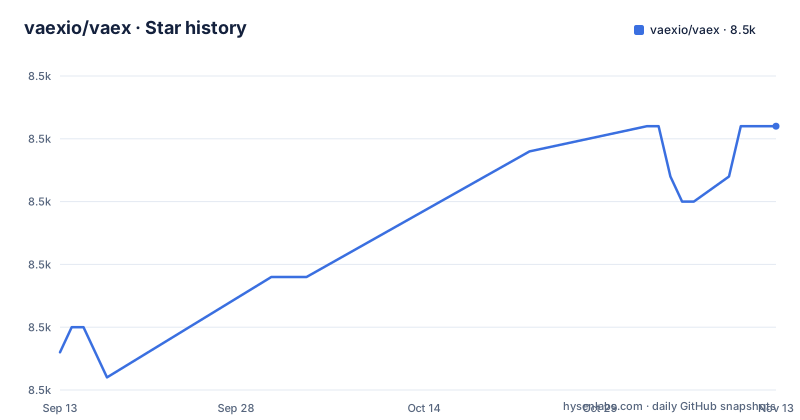
Star history
- vaexio/vaex8,518 ★ · +9
| Repository | 2026-09-13 | 2026-11-13 |
|---|---|---|
| vaexio/vaex | 8.5k | 8.5k |
9 Stars in the last 61 days, measured from the daily GitHub snapshot. Compare with other projects
Editorial analysis
Two install commands, and ten packages behind them
Vaex installs the way most Python projects do. Two commands are given in the README:
$ pip install vaexor, from conda-forge:
$ conda install -c conda-forge vaexBehind that one package name sits a repository that is not one package. The setup.py at the root is a convenience installer called vaex-meta, version 0.1.0, carrying the classifier "Private :: Do Not Upload to pypi server". Its packages list names ten distributions: vaex-core, vaex-viz, vaex-hdf5, vaex-server, vaex-astro, vaex-jupyter, vaex-ml, vaex-graphql, vaex-contrib and vaex. Each is installed from a direct reference into the packages/ directory with the [all] extra.
That source route is the third option, and the comment at the top of setup.py spells it out:
pip install https://github.com/vaexio/vaex/archive/refs/heads/master.zipWorth weighing what each one costs. The PyPI route gives you whatever the maintainers last uploaded. The archive route installs whatever is on the default branch, and the default branch here is master. The README sends you to docs.vaex.io for anything these two do not settle, including how to convert data.
The file stays on disk and the statistics arrive without a copy
Vaex describes itself as a lazy, out-of-core DataFrame, similar to Pandas, for tabular data that does not fit in memory. Three mechanisms carry that description.
Memory mapping comes first. HDF5 and Apache Arrow files are supported and opened without being read into memory. The zero memory copy policy follows from it, and lazy evaluation sits on top, so an expression is not computed until something asks for its value. The expression system is framed as the way to skip feature engineering steps that materialise new columns: the transformation happens when the data is needed rather than before it.
The second mechanism is the N-dimensional grid behind the statistics. Mean, sum, count and standard deviation are computed on that grid, which is the context for the README's figure of more than a billion samples per second. That number is the project's own claim, made in the opening description, and it is the first thing to test against your own file.
Out-of-core behaviour comes with a specific promise attached: filtering and evaluating expressions do not make copies, the data stays untouched on disk, and it is streamed only when needed. Lazy streaming from S3 is supported in combination with memory mapping, so remote files go through the same path. A separate documentation page covers converting CSV files or Pandas DataFrames into a format Vaex opens efficiently.
groupby on categories is the claim worth testing yourself
Two operations decide whether a DataFrame library survives contact with real data, and Vaex treats both as its selling points.
groupby is implemented in parallel, and the README singles out categorised columns: "especially when using categories (>1 billion/second)". The figure is the project's, stated in a feature bullet. If your grouping key is a high-cardinality string column instead of a category, that sentence tells you nothing about your case, and nothing in the README says where categories come from or how a value outside the category list is handled.
join is where the out-of-core design pays off, because the right-hand table is not copied or materialised. The README's own phrasing is that Vaex "doesn't copy/materialize the 'right' table when joining, saving gigabytes of memory", followed by "subsecond joining on a billion rows". Both sentences are feature-bullet copy, so read them as the shape of the design rather than as a benchmark you can plan around.
There is a tension between the two claims that is worth naming. The join argument depends on never materialising the right table. The groupby argument depends on categories. Categorising a column is itself a form of preparation, and the README does not account for that cost.
Visualization means histograms, density plots and 3d volume rendering
The second half of the library is vaex-viz, and it is not a plotting add-on in the usual sense. Visualization is done with histograms, density plots and 3d volume rendering, and the argument is that interactive exploration of big data should not require a sampled copy of the data first.
The package list shows where that work lives: vaex-viz for figures, vaex-hdf5 for the HDF5 side, vaex-jupyter for the notebook and dashboard integration the README describes with Jupyter and Voila, vaex-server for the server side, vaex-ml for machine learning. Two names in that list go unexplained: vaex-astro and vaex-graphql, neither of which the README mentions outside the setup.py list, plus a vaex-contrib package in the same position.
One advertised feature carries its own warning. Remote DataFrames appear in the extra features list marked "documentation coming soon", which makes it an idea in progress rather than something to plan a project on. The machine learning entry, "Machine Learning without (explicit) pipelines", is given nothing but a link to a tutorial page.
What none of this covers is the unglamorous case: what happens when you ask for a histogram of a table still sitting in CSV. The README points at documentation for converting data and stops there.
Three releases on the repository, the newest from 2018
The version story is where this repository helps you least, and it is worth knowing before you pin anything.
Three releases are listed: 0.3.10 from 2015-02-27, 1.0.0-beta.1 from 2016-06-10, and vaexpaper_v1 from 2018-03-29, described as the version linked to the paper. Nothing newer appears in that list, even though the last push to the repository was on 2026-10-29. The branch moves while the releases stay where they were, so the release list does not tell you which version pip handed you. The README's own package link points at the PyPI project vaex-core, which makes the package index the place that carries current versions rather than the release list.
The README also does not state which Python versions are supported. That is the first thing worth knowing before running either install command against an unusual interpreter, and it is not answered anywhere in the files at the root of the repository.
The tree still looks like a project with release machinery: docs/ with its own make target, a .readthedocs.yaml, a CHANGELOG.md, a RELEASE.md, and a script named .releash.py for cutting releases. That tooling exists without recent GitHub releases to show for it, which tells you something about where the project's versioning decisions live.
make init asks for .[dev], and setup.py defines only ci
Reproducing the project's own test environment turns up a small mismatch.
The Makefile has an init target that installs the package in editable mode with a dev extra:
python -m pip install -e .[dev]The root setup.py declares no dev extra. The only extra it declares is ci, and that list is documentation and test tooling: sphinx with a book theme, nbsphinx, myst_parser for the docs build, pytest with pytest-asyncio, pytest-mpl and pytest-timeout, then nbconvert, jupyterlab and plotly for the notebook tests. One entry is not a release at all: graphene-tornado is pinned to a fork archive URL, with a pull request comment in the source explaining why.
Running the suite is a single command, and it turns on a VAEX_DEV flag:
VAEX_DEV=1 python -m pytest tests/Two consequences for a reader. make init does not install what its name promises, so take the extras you want from the ci list explicitly instead of trusting the target. And pytest-mpl among the test dependencies says what the suite compares: generated figures, not only numbers, which is another way of saying the plotting layer is tested rather than left to inspection.
There is also a clean-test target that removes smæll2.parquet, tests/data/smæll2.csv.hdf5 and tests/data/parquet/, plus a find for partitioned test datasets.
Vaex or a cluster: the comparison the README actually offers
Vaex's argument against distributed engines is one sentence in the out-of-core section: delay the time before you need a cluster. That is the real difference in approach, and it deserves precision. Spark and Dask are distributed by construction, so running either means assembling workers and paying the coordination cost whether your data needs it or not. Vaex is a library over files you already have on one machine, memory-mapped, so the same exploration runs without that machinery.
The only head-to-head the README links is a Towards Data Science article titled "Beyond Pandas: Spark, Dask, Vaex and other big data technologies battling head to head", sitting among other articles from the same site and talks from PyData London 2019 and SciPy 2019. The README contains no comparison with Polars, which is where a lot of people end up when they ask the same question today.
So the choice is structural. Reach for Vaex when the data is on a disk you control, the work is exploratory, and standing up a cluster would cost more than the analysis. Reach for a distributed engine when the data already exceeds one machine or the work is scheduled rather than interactive. Out-of-core execution does not remove the point where a single machine stops being enough. It only lets that decision arrive later.
Editorial conclusion
Vaex fits a specific shape of work: big files already on disk, exploration and aggregation on one machine, and a preference for lazy evaluation over copying columns into memory. It does not fit a workflow that needs a cluster on day one, and this repository will not tell you which Python versions or which current release you get, since the README states neither and the release list stops at 2018. Before pinning it in a pipeline, check the vaex-core version on PyPI against the last push date of 2026-10-29, and read the category behaviour in the docs before relying on the groupby speed.
Frequently asked questions
How do you install vaex?
Two commands are given in the README: pip install vaex, or conda install -c conda-forge vaex. A third route installs from the default branch using the vaex-meta setup.py at the repository root, and the README points to docs.vaex.io for the rest.
Does vaex load the whole dataset into memory?
No. Vaex memory-maps HDF5 and Apache Arrow files, keeps the data untouched on disk and streams it only when needed, and states a zero memory copy policy for filtering and expression evaluation. Lazy streaming from S3 is supported in combination with memory mapping.
Is vaex still being maintained?
The repository is not archived, and the last push was on 2026-10-29. Its three GitHub releases date from 2015, 2016 and 2018, so the release list is not where current versions live; the README links to the PyPI project vaex-core.
Official sources
Add this badge to your README
If you maintain this project, the badge below links readers to this analysis and shows its maintenance status from the daily GitHub snapshot. Paste the markdown into your README; add ?metric=license or ?metric=stars to the image URL for a different field.

[](https://hysenlabs.com/projects/vaexio-vaex)Star history chart for your README
[](https://hysenlabs.com/projects/vaexio-vaex)Was this useful?