PlatformPlayer aggregates multiple video sources, and its JavaScript sources are the real extension point
Read-only mirror of Grayjay repo for issue tracking
At a glance
- What is it?
- The FUTO media app, shown here as a read-only GitHub mirror of the Grayjay repository, is an Android video player that treats every video site as a swappable source, with search, channels, feeds, downloads and casting layered on top. The architecture decision that shapes everything else is that third-party sources are JavaScript, which makes the extension mechanism unusually open and unusually risky at the same time.
- Who is it for?
- Adopt PlatformPlayer if you want one Android player over several video sites with a common search, subscription and download model, and you are comfortable reviewing the JavaScript source you install. Do not adopt it as a general-purpose player if you only need one service, since adding a source is the app's core abstraction and everything else is built on it.
- Can I use it commercially?
- Check first. The repository uses a licence we do not classify automatically, so read its LICENSE file before any commercial use.
- Is it still maintained?
- Yes. The repository received new commits within the last day.
- What is it written in?
- Mainly Kotlin, according to GitHub's language statistics.
Answers come from the project's GitHub data, last synced on October 23, 2026, and from our analysis. They are not legal advice.
Star history
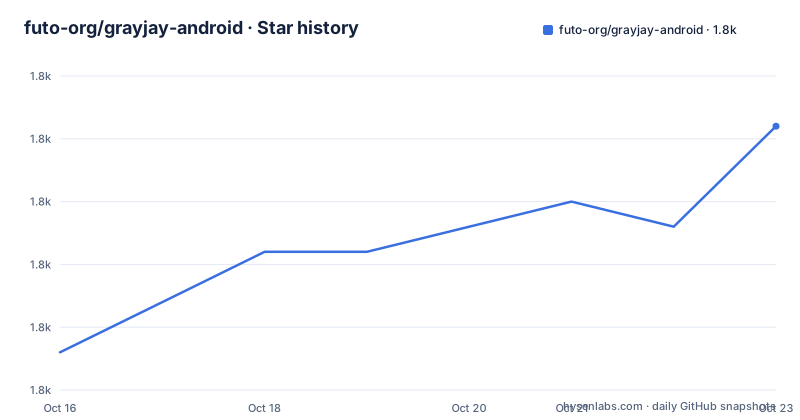
- futo-org/grayjay-android1,838 ★ · +9
| Repository | 2026-10-16 | 2026-10-23 |
|---|---|---|
| futo-org/grayjay-android | 1.8k | 1.8k |
9 Stars in the last 7 days, measured from the daily GitHub snapshot. Compare with other projects
Editorial analysis
This GitHub repository is a mirror, and the real one is on GitLab
The first fact to establish is where development actually happens. The repository description says plainly that this is just a mirror and that the main development repository is at the GitLab instance at gitlab.futo.org/videostreaming/grayjay. This GitHub copy is described as a read-only mirror kept for issue tracking.
That changes how you read everything else. Issues here are the supported communication channel, but a pull request against this copy is not how code reaches the app. The repository root supports the story: there is a.gitlab-ci.yml file, which is the pipeline for the real forge, alongside deploy-stable.sh, deploy-unstable.sh, sign-all-sources.sh and build-playstore.sh, which is a release pipeline rather than a contribution one.
There is a CONTRIBUTION.md rather than CONTRIBUTING.md, which is a smaller signal about how informal the process is, and a plugin-development.md that presumably covers the extension model described below.
Licence deserves attention and cannot be read from the metadata. GitHub classifies it as Other, meaning a custom licence file that is neither OSI-approved nor a standard permissive licence, and the metadata itself points to LICENSE.md. For a codebase in Kotlin that you might expect to fork and modify, an unclassifiable licence is the first thing to check rather than the last. You cannot assume the rights a permissive licence would give you.
The project is not archived and its last push was on 2026-10-16, which for a read-only mirror indicates the upstream repository is active.
Sources are JavaScript, installed and configured in the app
The app is a player that exposes multiple video websites as sources. These can be easily configured, third-party sources can be added manually, and this is done through a sources user interface with dedicated screens for installing a new source and configuring an existing one.
The extension mechanism is the architectural centre of the project. Additional sources are JavaScript sources, created and maintained by the community. Once the sources are configured, the combined results are shown throughout the app, which is why search, channels and feeds all feel like one application rather than a browser with tabs.
This has two consequences that pull in opposite directions, and both are real.
The positive one is that adding a site does not require a new release of the Android app. A community member can write a source, and the app can install it, which decouples the pace of site support from the pace of Play Store or F-Droid releases. It also means the app can support services the author has no relationship with.
The negative one is that installing a source means executing third-party code inside an app that may hold your credentials. The README itself addresses this, because sources have the ability to log in, allowing features that require credentials such as importing your playlists, importing your subscriptions, or getting personalised recommendations. Some platforms may require a membership to work at all.
So the same feature that makes the app extensible also means the trust boundary is per-source rather than per-app. A source you install can do whatever its JavaScript does with the session you grant it. There is no capability list in the README describing what a source may and may not access.
What the aggregation actually gives you
Four features carry most of the value, and the README is candid about which of them are complete.
Search posts your query to the underlying platforms and returns results ranked by relevance, across multiple sources at once. That is the feature that justifies the whole design: one search box over sites that do not otherwise talk to each other.
Channels are the creator-facing side. Users can view a creator's content, read more about them, or support them by donating, purchasing from their store or buying a membership. The architectural point here is that the app only links to other stores and does not play an intermediate role in the actual purchase process. FUTO's stated aim is creators retaining full ownership of their content, and this is where that shows up in the design rather than just the marketing. Creators configure their profile using NeoPass.
Feeds come in two flavours, and the distinction is instructive. Subscriptions are yours: creators you subscribe to appear in the creators tab, and their new uploads show up in the subscriptions tab. The Home feed is based purely on recommendations by the underlying platforms. The README is direct about the roadmap here: creator search and suggested creators are future items, and for Home it says the hope is to offer user-picked recommendation engines in the future.
So today the recommendation ranking is not yours. On Home you are seeing whatever algorithm the source site uses, which is a somewhat awkward fit for an app whose stated purpose is to frustrate centralisation, and it is the clearest gap between the project's stated aim and its current behaviour.
Playlists let you collect and customise videos and watch them in sequence, and they can be downloaded in their entirety. Both individual videos and playlists can be downloaded for offline playback, watchable with no active internet connection.
Casting has a documented capability order
The app casts to a big screen using FastCast, ChromeCast or AirPlay, and the README gives the one piece of guidance that saves real debugging: not all casting protocols support all features, and as a rule of thumb feature-wise FastCast is greater than ChromeCast which is greater than AirPlay.
That ordering is a protocol capability statement in disguise. FastCast being richest suggests it is the protocol the project has invested in, while AirPlay is the one you accept features will be missing from. If you own a specific device, that ordering is your first filter.
The README points to a separate document for casting details, at docs/casting.md, and the repository has a docs/ directory, so the per-protocol matrix lives there rather than in the overview.
Two features further down use the same word and are worth separating out, because they are not casting. The app can comment and rate, documented at docs/polycentric.md, and the app can link channels together, documented at docs/linking.md. Both README lines are truncated mid-sentence on the word cast, which reads like a copy error rather than meaning, but the two linked documents indicate two distinct subsystems with their own documentation.
Other settings are more conventional. The app offers a lot of settings customising how it looks and feels, with the README giving two examples: background behaviour, choosing between picture in picture, background play or shutting off entirely, and a choice between list views and video previews.
How it is built and released
The repository is a Gradle project in Kotlin, with the standard wrapper files, a settings.gradle and gradle.properties. There is a.gitmodules file and a pull-all-submodules.sh script, which means the source SDKs the app builds against live in separate repositories as submodules. That is consistent with the source model: a site integration is a separate artifact with its own version, consumed by the app.
The release scripts tell you the distribution story. build-playstore.sh and publish_playstore.py, alongside a venv-playstore.sh for the Python virtual environment, indicate Play Store publishing is scripted. update_fdroid_index.py and deploy-stable.sh, deploy-unstable.sh and sign-all-sources.sh indicate a second channel with its own update-index step and separate signing for the sources, which is what you would need if sources are signed artifacts from multiple contributors rather than loose files.
The presence of update_fdroid_index.py is itself informative, since it implies F-Droid packaging exists or is planned, which for an Android app is the difference between an installed-by-you sideload and a distribution channel with independent review.
There is also a dep/ directory, a lint.xml configuration, and a scripts/ directory. The gradle wrapper means the build is pinned to a Gradle version rather than whatever is on your PATH, which matters for reproducing a build.
What none of this tells you is the minimum Android version, the target SDK, or the size of a source SDK. Those would be in build.gradle or the docs, and the README does not summarise them, so anyone evaluating compatibility has to read the build files.
Editorial conclusion
Adopt PlatformPlayer if you want one Android player over several video sites with a common search, subscription and download model, and you are comfortable reviewing the JavaScript source you install. Do not adopt it as a general-purpose player if you only need one service, since adding a source is the app's core abstraction and everything else is built on it. Verify first which source SDK version your site integrations target and what credentials a source requires, because sources can log in and the README states that some platforms need a membership to work at all, which means the account you connect is not optional.
Frequently asked questions
Where is the main development repository for PlatformPlayer and Grayjay?
On GitLab at gitlab.futo.org/videostreaming/grayjay. This GitHub repository is described as just a read-only mirror kept for issue tracking, and it carries a .gitlab-ci.yml from the real pipeline.
How do you add a new video source to the FUTO media app?
Sources are JavaScript sources created and maintained by the community, and you install and configure them through the sources user interface in the app. Once configured, combined results appear throughout the app, and sources can log in to import playlists and subscriptions where credentials are required.
Which casting protocols does PlatformPlayer support and which has the most features?
It supports FastCast, ChromeCast and AirPlay. The README states that not all support all features, and gives the order feature-wise as FastCast greater than ChromeCast greater than AirPlay.
What licence is PlatformPlayer released under?
The repository carries a custom licence that GitHub cannot classify, under the Other category, with the details in the LICENSE.md file. The GitHub metadata itself points to that file rather than to a standard licence.
Official sources
Add this badge to your README
If you maintain this project, the badge below links readers to this analysis and shows its maintenance status from the daily GitHub snapshot. Paste the markdown into your README; add ?metric=license or ?metric=stars to the image URL for a different field.

[](https://hysenlabs.com/projects/futo-org-grayjay-android)Star history chart for your README
[](https://hysenlabs.com/projects/futo-org-grayjay-android)Was this useful?