curso-python: a Python course streamed live, with the code per class
Curso de Python desde cero y para todos los públicos con ejercicios
At a glance
- What is it?
- curso-python is a free Spanish-language Python course broadcast live on Twitch, and its repository holds the exercise code for each session in a numbered folder. Seven classes are published with video links, the planned syllabus runs to 29 topics, and the licence is a Creative Commons variant that blocks commercial reuse.
- Who is it for?
- curso-python fits a Spanish-speaking beginner who wants a structured path with exercises and the code for every session, and it fits a reader who prefers a cohort schedule and a live teacher over a self-paced tutorial. It does not fit a team that needs training material it can adapt for commercial training, because the licence is a Creative Commons NC-ND variant, and it does not fit anyone who cannot watch the live stream on Wednesdays at 18:00 Spanish time.
- Can I use it commercially?
- Check first. The repository uses a licence we do not classify automatically, so read its LICENSE file before any commercial use.
- Is it still maintained?
- Yes. The repository last received commits 22 days ago.
- What is it written in?
- Mainly Python, according to GitHub's language statistics.
Answers come from the project's GitHub data, last synced on November 7, 2026, and from our analysis. They are not legal advice.
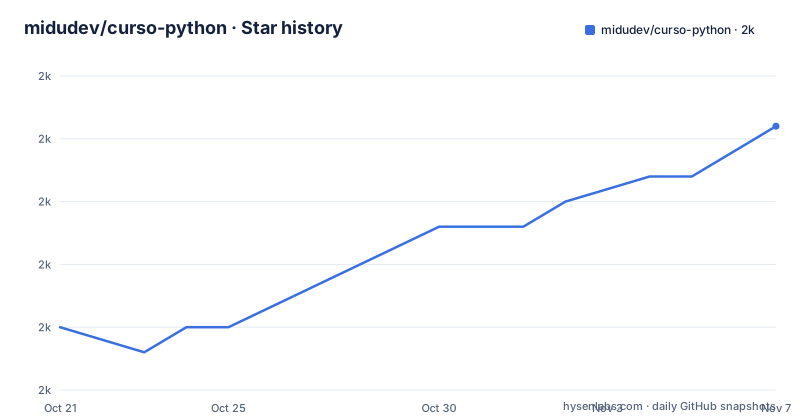
Star history
- midudev/curso-python1,998 ★ · +8
| Repository | 2026-10-21 | 2026-11-07 |
|---|---|---|
| midudev/curso-python | 2k | 2k |
8 Stars in the last 17 days, measured from the daily GitHub snapshot. Compare with other projects
Editorial analysis
A course whose schedule is a live stream
curso-python is a practical, free Python course that starts from zero, and the delivery method is the thing to understand first. It is broadcast live on twitch.tv/midudev, with new classes every Wednesday, and the README notes that the course is currently in emission with classes at 18:00 in Spanish time. The status badge in the README says the same thing, En emision. A published schedule table maps that slot onto Spain, the Canary Islands and a list of Latin American countries, from Mexico and Central America through the Caribbean, Colombia, Peru, Ecuador, Bolivia, Venezuela, Argentina, Chile, Uruguay and Paraguay. So the course is a live cohort rather than a video library. A subscriber to the Twitch channel also gets access to every class through the midudev academy site, which is how the recordings are distributed.
One numbered folder per class, each with its video link
The repository is the course material, and its shape mirrors the class list. The README publishes a table with one row per session: the class title, a link to the code folder, and a link to the video on Twitch. The first class covers Hello World, data types, type conversion and variables, and its code lives in 01_basic. The second is conditionals and lists with exercises, in 02_flow_control. Then 03_loops holds the while and for loops and functions, 04_logic covers programming logic and dictionaries, 05_regex covers regular expressions, 06_request_ai_dates covers fetching data, dates and classes, and 07_scraping covers data scraping. The top-level listing matches, with those seven directories plus a README, a LICENSE file, a test.py file and one oddly named entry, 001_Abre_esta_carpeta, which reads as an instruction to open that folder first.
Install: check your Python, clone, and open the folder
The setup is deliberately small, and the README's installation block is the whole procedure:
# Verifica tu versión de Python
python --version

# En algunos sistemas operativos el ejecutable es otro
python3 --version

# Clona el repositorio
git clone https://github.com/midudev/curso-python

# Accede al directorio
cd curso-python
The first two commands check that a Python 3.x interpreter is present, with a note that on some operating systems the executable is named differently. The stated requirements are Python 3.x, a code editor with VS Code recommended, and an internet connection for the live classes. If you would rather install nothing, the README points at online editors such as OnlineGDB. The environment is therefore not tied to the course; what you need beyond that is the willingness to follow a session live.
The planned syllabus covers 29 topics, and numbering skips one
A collapsed section in the README holds the full planned syllabus, and it is a useful map of what a complete course would contain. The list runs from introduction, variables and built-in functions, operators, strings, lists and tuples, through dictionaries, conditionals, loops, functions, type errors, date and time, exception handling, regular expressions, web scraping, classes and objects. Later entries cover sets, modules, list comprehension, higher-order functions, file handling, the Python package manager, virtual environments, statistics, Python for the web with Django, Python with MongoDB, APIs from scratch and Pandas. Entries already delivered carry a check mark. The list is numbered 1 to 29 and the number 7 is absent, which reads like an editing slip in the source file rather than a deliberate hole, and it is a small reminder that this document is maintained by hand as the course runs.
A Creative Commons licence that blocks commercial reuse
The licence is the constraint to read before you plan to use this material in a company. GitHub cannot classify the licence in this repository, and the README badge describes it as CC BY-NC-ND, which is attribution with non-commercial and no-derivatives terms. Read the LICENSE file in the repository for the exact wording, since the classifier could not map it to a standard licence and the custom text is what governs. The practical effect of the NC and ND terms is narrow but real: you can read the course, follow it, run the exercises and clone the repository, but you cannot ship a modified version of the material as part of a paid course or a commercial training product. The repository has no GitHub releases either, so there is no packaged version to install. Attribution is required, and for anything beyond personal study, ask the author rather than assume the badge settles it.
Where this course is the wrong tool
The format decides the audience, and the limits follow from it. A live stream on a fixed weekday means the content arrives on a schedule you do not control, and the repository only helps if you keep up with the sessions. For someone who needs a reference to consult six months later, a course organised by broadcast order is a poor reference, since there is no index by topic and no search. The exercise code is also the only artefact that outlives the stream, and the README describes the course as practical with exercises without publishing the exercise statements separately, so the standalone value of the repository is a set of session folders rather than a self-contained workbook. If your goal is a specific outcome, such as getting a web service running, a topic-indexed course built around that goal will serve you better than a general sequence broadcast weekly.
Live cohort teaching versus a self-paced tutorial
The alternative to a live, Spanish-language course is a self-paced one, and the difference in approach is more than format. A self-paced course can be indexed by topic, searched, and revisited, and it can be edited when the language changes, which matters for a course that has already been running long enough to need Django, MongoDB and Pandas sections. What it usually cannot give you is a schedule with other people on it, a teacher answering questions in real time, and the accountability of a fixed slot on the calendar. This course trades searchability and longevity for the live element, and it adds two things a written course rarely includes: a companion video for every code folder, and a published running order that a beginner can follow without deciding what to study next. For a beginner the second point may matter more than it seems, since deciding what to learn next is where self-directed learners stall.
Editorial conclusion
curso-python fits a Spanish-speaking beginner who wants a structured path with exercises and the code for every session, and it fits a reader who prefers a cohort schedule and a live teacher over a self-paced tutorial. It does not fit a team that needs training material it can adapt for commercial training, because the licence is a Creative Commons NC-ND variant, and it does not fit anyone who cannot watch the live stream on Wednesdays at 18:00 Spanish time. Verify the licence file in the repository before reusing a single exercise. The last push to the repository was on 2026-10-16, and the project publishes no GitHub releases.
Frequently asked questions
How do I set up the curso-python course on my machine?
Check that Python 3.x is available with python --version or python3 --version, then clone the repository with git clone https://github.com/midudev/curso-python and move into the curso-python directory. The stated requirements are Python 3.x, a code editor with VS Code recommended, and an internet connection for the live classes.
How often are new classes released and where can I watch them?
The course is broadcast live on twitch.tv/midudev with new classes every Wednesday at 18:00 in Spanish time, and the README publishes a schedule table for Spain, the Canary Islands and a set of Latin American countries. Twitch subscribers also get access to every class through the midudev academy.
What code is included in the repository?
The repository holds one numbered folder per session with the exercise code, and the README links each folder to its class video. The published sessions cover 01_basic, 02_flow_control, 03_loops, 04_logic, 05_regex, 06_request_ai_dates and 07_scraping.
Can I use the curso-python material in a commercial course?
The licence is one GitHub cannot classify, and the README badge describes it as CC BY-NC-ND, which carries non-commercial and no-derivatives terms. Read the LICENSE file in the repository for the exact wording before reusing any of the material, and ask the author if you intend a commercial use.
Official sources
Add this badge to your README
If you maintain this project, the badge below links readers to this analysis and shows its maintenance status from the daily GitHub snapshot. Paste the markdown into your README; add ?metric=license or ?metric=stars to the image URL for a different field.

[](https://hysenlabs.com/projects/midudev-curso-python)Star history chart for your README
[](https://hysenlabs.com/projects/midudev-curso-python)Was this useful?