video-subtitle-extractor turns hardsub into srt, and its modes trade speed for dropped lines
Hard-coded subtitle extraction from video, generating SRT files without any third-party API, using local deep-learning-based text recognition that includes subtitle area detection and content extraction. A GUI tool for extracting hardsub subtitles from videos and generating SRT files.
At a glance
- What is it?
- VSE is a local Python toolchain that pulls key frames out of a video, finds and recognises the burned-in text, and writes an srt file beside the original. It needs no OCR API, its three modes disagree about how much accuracy costs, and two of its four runtime backends come with caveats.
- Who is it for?
- video-subtitle-extractor fits one job well: turning burned-in subtitles into an srt on your own machine, with no API key, no upload and a GUI that takes a few clicks. Do not reach for it when you need documented command line options, a subtitle region that survives mixed video resolutions, or a supported macOS GPU path.
- Can I use it commercially?
- Yes. Apache-2.0 is a permissive licence: you can use, modify and sell software built on it, as long as you keep its copyright and licence notices.
- Is it still maintained?
- Activity is slowing. The repository last received commits 7 months ago.
- What is it written in?
- Mainly Python, according to GitHub's language statistics.
Answers come from the project's GitHub data, last synced on November 14, 2026, and from our analysis. They are not legal advice.
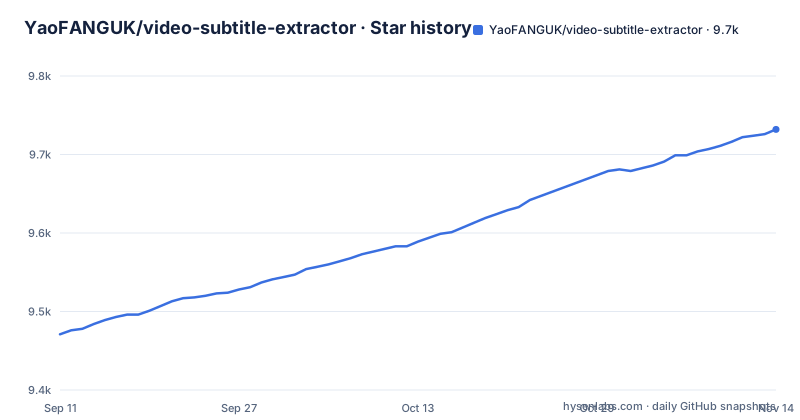
Star history
- YaoFANGUK/video-subtitle-extractor9,732 ★ · +261
| Repository | 2026-09-11 | 2026-11-14 |
|---|---|---|
| YaoFANGUK/video-subtitle-extractor | 9.5k | 9.7k |
261 Stars in the last 64 days, measured from the daily GitHub snapshot. Compare with other projects
Editorial analysis
Key frames, a text box, a recognition pass, then an srt beside the video
The pipeline is described as a chain of small steps rather than one model: pull the key frames out of the video, detect where text sits inside each frame, recognise what that text says, filter out text outside the subtitle region, delete repeated subtitle lines, and write the result as an srt subtitle file or a txt file. What lands on disk is a sidecar, and the original video is not what gets edited. That matters for iteration: if the detection clips a line, you redraw the subtitle region and run the same file again instead of hunting for a defect in the picture. Recognition runs locally. The project states that no third party API has to be set up and that no online OCR service such as Baidu or Alibaba is involved, so frames from footage you are not permitted to upload never leave the machine. Language coverage is claimed at 87, running from Simplified Chinese with English bilingual text through Japanese, Korean, Vietnamese, Arabic, French, German, Russian, Spanish, Portuguese and Italian. Watermark and logo text are handled as recognised strings rather than as pixels, which is where the configuration file comes in.
Fast mode drops lines, precise mode crawls, and the mode table disagrees with its own note
Three modes sit at the centre of the design. Fast is the recommended default and uses a lightweight model, which means it may lose a small number of subtitles and produce a few typos. Auto is also recommended and picks the model for you: the lightweight one on CPU, the accurate one on GPU, slower, still able to lose a few subtitles, with almost no typos. Precise runs the accurate model with per-frame detection on GPU, loses nothing, has almost no typos, and is marked very slow and not recommended. The guidance is to stay on fast or auto and switch to precise only when the first two lose a lot of subtitle lines. The mode table pairs each mode with hardware, model size and detection engine: fast runs with or without a GPU on the mini model, auto uses the large model when a GPU is present and the mini model when it is not, and precise pairs the large model with the VSE engine. Then a note below that table says the subtitle detection engine is VideoSubFinder on Windows, Linux and macOS. The two statements cannot both describe precise mode on those platforms, and no document says which engine you actually get.
Batch extraction only works when every file shares one resolution and one subtitle band
The workflow is short: click Open, choose the video file, adjust the subtitle region, click Run. For a single file you pick one video. For batch extraction you pick several, and the documentation attaches a condition to that: every video must keep the same resolution and the same subtitle region. The reason is visible in the design. The subtitle region you draw is a rectangle in the frame, and the text filter discards anything outside it, so a batch that mixes a 1080p file with a 720p file, or a file whose subtitles sit higher or lower in the picture, points that rectangle at the wrong band of pixels. Nothing describes what happens then. Two consequences follow. Group your inputs by layout before running, and expect to re-run a batch that mixes sources.
typoMap.json is where OCR mistakes and watermark strings get patched by hand
Text that has to disappear or be rewritten is handled by a mapping file at backend/configs/typoMap.json. You add the string exactly as it was recognised on the left and the replacement, or nothing, on the right.
{
	"l'm": "I'm",
	"l just": "I just",
	"Let'sqo": "Let's go",
	"Iife": "life",
	"威筋": "威胁",
  	"性感荷官在线发牌": ""
}
An empty value deletes the string, so every occurrence of 性感荷官在线发牌 disappears, and 威筋 becomes 威胁. The other entries are recognition confusions: a lowercase l where an I belongs, Iife where life belongs, a missing space in Let's go. This is the whole mechanism behind removing specific watermark or logo text: the text is recognised, then substituted or dropped. You add the strings as the recogniser actually produced them, including that missing space. No document describes a fuzzy match or how the map is scoped per language, even though requirements.txt pins Levenshtein 0.26.0 and nothing says where that distance is used. Removing the pixels instead is the job of the separate video-subtitle-remover project.
Chinese characters and spaces in paths fail without an error message
One rule is stated more firmly than any other: do not put Chinese characters or spaces in the path to the video or to the program, because unknown errors may appear. Two examples are given, one for the executable and one for a video file.
D:\下载\vse\运行程序.exe
E:\study\kaoyan\sanshang youya.mp4
The first fails because of the Chinese characters, the second because of the space in the file name. What makes this costly is the diagnosis, not the rule: the documented symptom is an unknown error, so the natural reaction is to blame the OCR stack, the CUDA install or the model, and each of those is a much longer debugging session than moving a file. A second failure has its own one-line answer: if a 7z archive will not extract, upgrade the 7-zip program to the latest version. The normal route is to download the release archive and run it, and the source route with a conda environment is the fallback for when that does not start.
CUDA 11.8 is recommended, and the ONNX backend is marked untested with no issue channel
Four runtime backends are supported, and the difference between them decides whether your bug reports can be answered. CUDA is the recommended path for NVIDIA cards, CUDA 11.8 with cuDNN 8.6.0, and macOS has no CUDA at all. Cards in the NVIDIA 50 series need CUDA 12.8.0 or newer, which Paddle 3.3.1 still does not support, so the project points those users at the DirectML build instead. DirectML covers AMD, NVIDIA and Intel GPUs on Windows. The CPU baseline is two lines.
pip install paddlepaddle==3.3.1 -i https://www.paddlepaddle.org.cn/packages/stable/cpu/
pip install -r requirements.txt
The ONNX backend is for Linux and macOS machines with AMD, Metal or Apple Silicon GPUs. It is described as untested, its issue reports are explicitly not wanted, and its recipe ends by asking you to edit requirements_directml.txt into a file of your own and install it, with requirements_coreml.txt given as the worked example containing paddle2onnx==1.3.1 and onnxruntime-coreml==1.13.1. That example file is not in the top-level listing, which holds requirements.txt and requirements_directml.txt only. So an Apple Silicon user is told to run an untested path, adjust a dependency file by hand, and stay quiet about the result.
gui.py or backend/main.py, and a command line route with no documented flags
Source installation asks for Python 3.12 or newer, a virtual environment, and then one of two entry points.
python -m venv videoEnv
source videoEnv/bin/activate
pip install -r requirements.txt
python gui.py
The other entry point is `python ./backend/main.py`. Past that invocation the documentation gives no flag, no argument and no configuration key for the command line route, so a scripted run has nothing documented to pass it; the settings that do exist are reached through the GUI, and the one file the documentation names for you to edit is backend/configs/typoMap.json. The dependency list shows what each layer costs: pyside6 and pyside6-fluent-widgets for the desktop shell, paddlepaddle with paddleocr 3.4.0 for recognition, plus opencv-python, lmdb, shapely, pyclipper, pysrt, imageio-ffmpeg, wordsegment and scikit-image. The licence is Apache-2.0. Release 2.2.0 shipped on 2026-04-04, after 2.0.3 in April 2025 and 2.0.0 in October 2023, and the last push to the repository was on 2026-04-09.
Editorial conclusion
video-subtitle-extractor fits one job well: turning burned-in subtitles into an srt on your own machine, with no API key, no upload and a GUI that takes a few clicks. Do not reach for it when you need documented command line options, a subtitle region that survives mixed video resolutions, or a supported macOS GPU path. Check three things before the first run. Keep Chinese characters and spaces out of both the video path and the program path, since the documented failures there arrive as unknown errors. Match the backend to the card, because CUDA 11.8 with cuDNN 8.6.0 is the recommended pair, macOS has no CUDA, and the ONNX route is labelled untested with issue reports declined. And run release 2.2.0 rather than the 2.0 line, since the last push was on 2026-04-09.
Frequently asked questions
Is there a way to extract subtitles from a video?
For text burned into the picture, yes. video-subtitle-extractor extracts hardsub into an srt file by pulling key frames, detecting the subtitle region, recognising the text locally and filtering out repeated lines, without needing any OCR API.
Does video-subtitle-extractor need an online OCR service or an API key?
No. The project states that recognition runs locally and that no third party API and no online OCR service such as Baidu or Alibaba is needed. The requirements pin paddlepaddle with paddleocr 3.4.0, which is what performs the recognition.
Why does video-subtitle-extractor drop subtitle lines?
Fast mode uses the lightweight model and may lose a few lines and add some typos, while auto picks the model from your hardware and is slower. Precise mode does per-frame detection on GPU and is described as very slow, so it is only worth reaching for when the first two lose many lines.
Can video-subtitle-extractor remove watermarks and station logos?
At text level, yes. Add the strings to backend/configs/typoMap.json and map each to its replacement, or to an empty value to delete every occurrence. Removing the pixels themselves belongs to the separate video-subtitle-remover project.
Which GPU backend should I pick for video-subtitle-extractor?
CUDA 11.8 with cuDNN 8.6.0 is the recommended pair for NVIDIA cards, macOS does not support CUDA, and NVIDIA 50 series cards need CUDA 12.8.0 or newer, which Paddle 3.3.1 does not support yet, so the project suggests the DirectML build there. The ONNX backend for AMD, Metal and Apple Silicon is labelled untested and does not take issue reports.
Official sources
Add this badge to your README
If you maintain this project, the badge below links readers to this analysis and shows its maintenance status from the daily GitHub snapshot. Paste the markdown into your README; add ?metric=license or ?metric=stars to the image URL for a different field.

[](https://hysenlabs.com/projects/yaofanguk-video-subtitle-extractor)Star history chart for your README
[](https://hysenlabs.com/projects/yaofanguk-video-subtitle-extractor)Was this useful?