Docker Hardened Images Catalog: Declarative Definitions for Minimal Containers
DHI definition files and catalog metadata
At a glance
- What is it?
- This repository holds declarative YAML definitions for hardened container images and Helm charts published under the dhi.io namespace. The catalog is the source of truth for building minimal, non-root images, but it is a definition store, not a build tool.
- Who is it for?
- Adopt this catalog if you need auditable, declarative definitions for minimal container images and Helm charts, and if you are comfortable pulling pre-built images from the dhi.io registry. Do not adopt it if you expect a build tool, a CLI, or a local build pipeline, because the repository provides only YAML definitions and documentation.
- Can I use it commercially?
- Check first. The repository uses a licence we do not classify automatically, so read its LICENSE file before any commercial use.
- Is it still maintained?
- Yes. The repository last received commits 18 days ago.
- What is it written in?
- Mainly Shell, according to GitHub's language statistics.
Answers come from the project's GitHub data, last synced on October 4, 2026, and from our analysis. They are not legal advice.
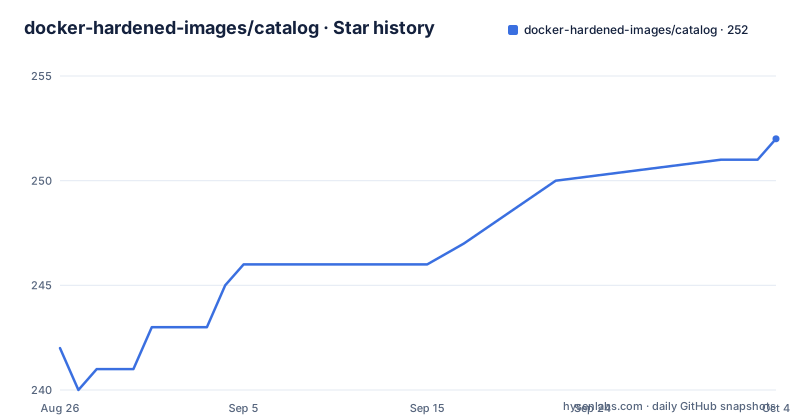
Star history
- docker-hardened-images/catalog252 ★ · +10
| Repository | 2026-08-26 | 2026-10-04 |
|---|---|---|
| docker-hardened-images/catalog | 242 | 252 |
10 Stars in the last 39 days, measured from the daily GitHub snapshot. Compare with other projects
Editorial analysis
What This Catalog Actually Provides
The docker-hardened-images/catalog repository is a collection of declarative definition files for container images and Helm charts. It is not a build system and it does not contain Dockerfiles or compiled artifacts. Each image definition is a YAML file that describes metadata, base OS, packages, build steps, security settings, runtime configuration, and tests. The README states that these definitions enable auditability and customization, which is the core value proposition. The target audience is teams that want to inspect exactly what goes into a hardened image before pulling it, rather than trusting a black-box build. The catalog also includes Helm chart definitions for deploying applications like alertmanager, cert-manager, and vault, but those are also declarative specifications, not ready-to-run manifests.
How Image Definitions Are Organized
The repository structure is strict and predictable. Under catalog/image/, each image has a directory named after the software, such as nginx or postgres. Inside that directory, subdirectories represent OS variants, for example alpine, debian, and debian-12. Each variant contains one or more YAML files that correspond to release channels. The nginx example shows alpine/mainline.yaml and alpine/stable.yaml, plus debian/mainline.yaml and debian/mainline-dev.yaml. Variants can be runtime, -dev, or -compat. A runtime variant is the minimal image, a -dev variant adds build tools, shells, and package managers, and a -compat variant exists for Helm chart compatibility. This split means you can choose a smaller image for production and a larger one for debugging, but you must know which variant you need before pulling.
The YAML Schema Covers More Than Build Steps
Each image definition file is not just a list of packages. According to the README, the YAML contains metadata such as image name, tags, and supported platforms; contents like base OS and repositories; build pipeline steps for multi-stage builds; security settings for user and group configuration and file permissions; runtime settings for entrypoint, command, environment variables, and exposed ports; and automated tests for validation and compliance. This is a broad schema. It means the definitions can be used to reproduce an image from scratch, but also to audit the final image's runtime behavior. The inclusion of tests in the definition files is notable, because it implies that the build pipeline that consumes these definitions runs those tests, but the repository itself does not show how that happens. The build and test execution logic lives elsewhere, likely in Docker's internal infrastructure.
Getting the Images Without Building Anything
The README gives direct pull commands for pre-built images. For example, docker pull dhi.io/nginx:1.29.3-debian13, docker pull dhi.io/python:3.12-debian13, and docker pull dhi.io/postgres:17-debian13. These commands work against Docker's registry, and the tag format encodes the software version and the base OS version. This is the simplest way to use the catalog: you do not need to clone the repository or run any build tooling. The catalog serves as documentation and provenance for those images. If you want to customize an image, you would need to take the YAML definition and feed it into whatever build system Docker uses, but that system is not described in this repository. The README links to the Docker Hardened Images product page, which suggests the build pipeline is a commercial service.
What the Catalog Does Not Tell You
The repository has clear gaps. There is no information about how the YAML definitions are validated, what schema they must conform to, or how the build pipeline consumes them. The README mentions 'automated validation and compliance checks' as part of the definition files, but it does not specify which tools run those checks or what standards they enforce. There is also no mention of the actual base image digests or how often the images are rebuilt. The 'Last push' field is unknown and no releases were retrieved, so you cannot tell from the repository alone how fresh the definitions are. If you need to verify that a specific image has a recent security patch, you must check the dhi.io registry or the image's own metadata, not this catalog.
A Real Alternative: Writing Your Own Minimal Dockerfiles
The obvious alternative is to maintain your own Dockerfiles based on official base images like alpine or distroless. The difference in approach is significant. This catalog gives you declarative YAML that abstracts away the Dockerfile syntax and the build steps, but it also hides the concrete commands that produce the final image. With your own Dockerfile, you see every RUN and COPY, and you control the exact base image digest. The trade-off is maintenance burden: you must track upstream updates for every package and language runtime yourself. This catalog centralizes that work, but it also centralizes the decision-making. For a team that needs to pass a security audit, having a Dockerfile with explicit commands might be more convincing than a YAML file that says 'multi-stage build steps' without showing them. For a team that wants to reduce duplication across many images, the catalog's package definitions and shared components are a clear win.
Maintenance, Licensing, and a Caveat
The README states that the project is licensed under Apache 2.0 and points to a LICENSE.txt file in the catalog directory. However, the repository metadata shows License: NOASSERTION, which is a mismatch. This is worth checking before you rely on the license for your own redistribution. The maintenance model is community-driven: the README invites contributions for new image definitions, bug reports, enhancements, documentation, and testing. There is a CONTRIBUTING.md and a CODE_OF_CONDUCT.md, so the project has a governance structure. The catalog includes a 'package' directory with reusable definitions for common components like golang, node, and python, which suggests a deliberate effort to reduce duplication across images. That is a maintenance advantage, but it also means a change to a shared package can affect many images, so you should check the impact of any update. The repository is not archived, but the last push date is unknown, so you cannot assess recent activity from this material alone.
Editorial conclusion
Adopt this catalog if you need auditable, declarative definitions for minimal container images and Helm charts, and if you are comfortable pulling pre-built images from the dhi.io registry. Do not adopt it if you expect a build tool, a CLI, or a local build pipeline, because the repository provides only YAML definitions and documentation. Before relying on any image, verify the specific variant definition for your OS and version, confirm the runtime user and exposed ports match your security policy, and check the license status: the repository displays NOASSERTION in metadata even though the README cites Apache 2.0, so confirm the license terms for your use case.
Frequently asked questions
What is in the docker-hardened-images/catalog repository?
The declarative definitions behind Docker Hardened Images: container image specifications under image/, Helm chart definitions under chart/, and shared reusable package definitions under package/, plus the licence, contributing guide, code of conduct and a security policy.
How do I pull a hardened image and what does the tag mean?
From the dhi.io registry, for example dhi.io/nginx:1.29.3-debian13, dhi.io/python:3.12-debian13 or dhi.io/postgres:17-debian13. The tag is the upstream version followed by the operating system variant, and the repository publishes no releases or changelog of its own.
What licence applies to the catalog definitions?
The page states the Apache License 2.0 in two places and points at LICENSE.txt. The repository itself reports no detectable licence, because the file is named LICENSE.txt rather than at a conventional path.
What is the difference between the runtime, -dev and -compat variants?
The plain name is the minimal runtime image, a -dev suffix is a development image with build tools, a shell and package managers, and a -compat suffix marks a Helm-chart compatibility image used by the chart definitions in the same repository.
Official sources
Add this badge to your README
If you maintain this project, the badge below links readers to this analysis and shows its maintenance status from the daily GitHub snapshot. Paste the markdown into your README; add ?metric=license or ?metric=stars to the image URL for a different field.

[](https://hysenlabs.com/projects/docker-hardened-images-catalog)Star history chart for your README
[](https://hysenlabs.com/projects/docker-hardened-images-catalog)