HunyuanVideo-I2V for Local Image-to-Video Generation and LoRA Customization
HunyuanVideo-I2V: A Customizable Image-to-Video Model based on HunyuanVideo
At a glance
- What is it?
- HunyuanVideo-I2V is Tencent's PyTorch image-to-video model, with pretrained weights, sampling code, multi-GPU inference, and LoRA training for custom effects. It suits researchers who need direct control over model code and weights, but its documentation leaves important hardware and invocation details unstated.
- Who is it for?
- Adopt HunyuanVideo-I2V if you need Tencent's image-to-video model definitions, pretrained weights, sampling code, or LoRA training rather than a managed web interface. Do not choose it as a low-friction production component without first confirming hardware requirements, license terms, checkpoint size, and expected output.
- Can I use it commercially?
- Check first. The repository uses a licence we do not classify automatically, so read its LICENSE file before any commercial use.
- Is it still maintained?
- Activity is slowing. The repository last received commits 7 months ago.
- What is it written in?
- Mainly Python, according to GitHub's language statistics.
Answers come from the project's GitHub data, last synced on November 7, 2026, and from our analysis. They are not legal advice.
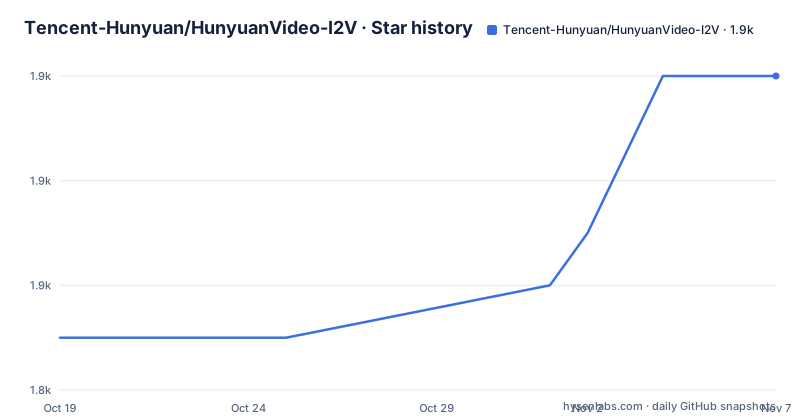
Star history
- Tencent-Hunyuan/HunyuanVideo-I2V1,854 ★ · +5
| Repository | 2026-10-19 | 2026-11-07 |
|---|---|---|
| Tencent-Hunyuan/HunyuanVideo-I2V | 1.8k | 1.9k |
5 Stars in the last 19 days, measured from the daily GitHub snapshot. Compare with other projects
Editorial analysis
What HunyuanVideo-I2V Adds to Image-to-Video Work
HunyuanVideo-I2V addresses a specific problem: generating a video from an initial image while retaining that image as the visual anchor for the sequence. It is aimed at engineers and researchers who want to inspect or modify an image-conditioned generation system rather than submit work to a closed web service. The repository contains official PyTorch model definitions, pretrained weights, inference and sampling code, plus LoRA training code for special effects.
The intended customization boundary is worth noting. The base project supplies pretrained video generation, while the LoRA path is aimed at teaching a particular effect such as hair growth or an embrace. This makes it relevant to teams experimenting with repeatable visual behavior beyond a one-off prompt. It is less directly suited to users whose only requirement is a hosted video generator.
The README also links to a web playground and project page, but the repository itself is oriented toward local experimentation. Community integrations include `ComfyUI-HunyuanVideoWrapper` and `HunyuanVideoGP`. Those links show alternative deployment paths, yet they are separate community projects and should not be treated as part of the official repository's core runtime.
Repository Structure and Image-Conditioned Data Flow
The repository layout exposes the main stages of the workflow. Model-related implementation lives under `hyvideo/`, while `sample_image2video.py` is the visible sampling entry point for turning an input image into generated video. Pretrained files belong in the `ckpts/` area, with acquisition instructions in `ckpts/README.md`. Training has a separate top-level entry point named `train_image2video_lora.py`.
That separation matters for adoption costs. Inference and LoRA training are not hidden inside one packaged application. Users must account for Python code, model checkpoints, external media tooling, and accelerator resources. The inference path can operate on a single GPU, while the project also lists multi-GPU sequence-parallel inference through xDiT for users who want to distribute the sequence across multiple GPUs.
The repository's topics include `diffusion-models`, `image-to-video`, `image-to-video-generation`, and `videogeneration`. The README describes HunyuanVideo-I2V as an image-to-video generation framework, but it does not document tensor shapes, the exact conditioning path, scheduler sequence, attention layout, or memory-saving strategy. The confirmed workflow is therefore image input, loading compatible model assets, executing the sampling code, and writing a video result. More specific architectural claims would require direct inspection of `sample_image2video.py` and the modules under `hyvideo/`.
Dependencies, Checkpoints, and the Unstated Hardware Envelope
The first setup stage is dependency installation. The repository supplies `requirements.txt`, which pins packages including `diffusers==0.31.0`, `accelerate==1.1.1`, `transformers==4.48.0`, `peft==0.13.2`, `deepspeed==0.15.1`, `imageio==2.34.0`, and `imageio-ffmpeg==0.5.1`. It also depends on CLIP through a direct Git URL. Pinning these versions reduces one class of dependency drift, but it does not establish compatibility with every Python, CUDA, or GPU combination.
The README has an installation section for Linux, yet its visible text does not show an exact installation command. It does not state a supported Python version, CUDA version, GPU model, memory requirement, supported precision, maximum resolution, or generation duration. The `ckpts/README.md` guide must also be consulted before local inference because pretrained weights are a separate repository asset.
There is no defensible setup command to include without inventing an invocation. The concrete first steps are to clone or download the repository, create a Python environment suitable for the full `hyvideo/` stack, install the packages listed in `requirements.txt`, and follow `ckpts/README.md` for checkpoint acquisition. Teams that require byte-for-byte environment reproduction must record the Python and CUDA choices themselves because the README does not supply that matrix.
HunyuanVideo-I2V is a source release rather than a self-contained installer. That gives engineers direct access to the model implementation, but it leaves operating-system, driver, and accelerator compatibility work in their hands.
Preparing the First Image-to-Video Inference
After installing the pinned dependencies and downloading the checkpoints through `ckpts/README.md`, `sample_image2video.py` is the repository's visible inference and sampling entry point. A first local use requires a reference image, compatible pretrained files, the model configuration expected by the script, and media support from `imageio-ffmpeg`.
The README table of contents names single-GPU inference, command-line usage, and more configurations. However, it does not include the actual argument list, configuration-file name, input path flag, output path flag, or expected console messages. It would therefore be unsafe to present a plausible `python sample_image2video.py ...` example because that could introduce flags the script does not accept.
Use `sample_image2video.py` together with its repository documentation rather than guessing its interface. Select a reference image whose subject is visually distinct, so unwanted identity changes or frame drift are easier to identify. Once the command returns a video, compare the generated first frame with the reference and inspect motion across the full sequence. The README's first-frame consistency examples indicate that visual continuity deserves direct review rather than inference from a successful process exit.
If the script fails during media handling, first check the pinned `imageio`, `imageio-ffmpeg`, and `opencv-python` packages. That is a specific diagnostic path suggested by `requirements.txt`, not a claim that a documented failure is known. Model-loading and accelerator failures require separate investigation because the README does not record their causes.
Single-GPU and Sequence-Parallel Inference Choices
The official open-source plan marks inference, checkpoints, LoRA training scripts, and multi-GPU sequence-parallel inference as available. This gives users two documented deployment paths. Single-GPU inference is the direct route represented by the standard sampling script, while the parallel path is powered by xDiT and is intended to improve inference speed when additional GPUs are available.
Neither path can be evaluated responsibly from vague resource expectations. The README does not provide minimum VRAM for single-GPU inference, precision modes, supported accelerator counts, sequence-parallel launch commands, or measured speedups. The presence of `deepspeed==0.15.1` in `requirements.txt` indicates that distributed tooling is part of the declared dependency set, but it does not by itself prove that every workflow requires DeepSpeed.
The pinned stack also gives clues about the implementation boundary. `diffusers` and `transformers` provide model ecosystem components, `accelerate` handles distributed execution helpers, `safetensors` supports serialized tensor files, and `peft` supports parameter-efficient adaptation. These are dependency facts, not evidence of a particular generated-output quality or runtime.
Sequence parallelism should be considered when the deployment already has multiple GPUs and an established distributed environment. Buying additional accelerators before measuring the single-GPU path would be premature because the repository provides no throughput figures or memory requirements. Start by confirming whether the standard sampling script fits the available hardware, then evaluate xDiT only if parallel execution is justified.
LoRA Customization After the Published Code Fix
The repository includes `train_image2video_lora.py` and inference support for customizable I2V LoRA effects. The README's demonstrations name hair growth and embrace as examples. This is a distinct path from ordinary base-model inference: it is intended to adapt the image-to-video model toward a specific visual effect rather than replace the base checkpoint with an unrelated generation system.
Version discipline is especially important here. The project news states that the LoRA training and inference code was updated on 2025-03-11 after a bug fix. The earlier notes should not be treated as documentation for the corrected implementation. Users following the current repository files should keep training and inference code from the same project revision, then apply a LoRA through the interface documented by that revision.
The README does not document the training dataset schema, annotation format, optimization hyperparameters, hardware requirement, checkpoint naming convention, or training duration. Those omissions matter because `train_image2video_lora.py` being present establishes that a training path exists, but it does not make the training workflow reproducible from the README alone. Dataset layout and example arguments must be checked in the relevant scripts or their associated files.
LoRA training is still a meaningful choice when the desired result is a narrowly defined effect that should appear across selected reference images. It is the wrong path when the requirement is simply to generate one clip, or when the team cannot maintain dataset preparation and checkpoint validation.
First-Frame Consistency, Model Fixes, and Output Review
The project has experienced a model-level correction that affects how older assets should be interpreted. According to the README news dated 2025-03-07, the open-source release had a bug that caused identity changes. The project directs users to the newer model weights on Hugging Face to improve first-frame consistency and visual quality.
This history makes output inspection a required part of an initial evaluation. Generate a short sequence from a recognizable reference image, compare the initial condition with the result, and watch whether the subject's identity changes as motion progresses. The README contains a dedicated first-frame consistency demonstration, which signals that this is a central evaluation concern for image-to-video generation.
The repository does not provide a formal acceptance threshold for identity similarity, motion quality, prompt adherence, or temporal artifacts. It also does not document automated evaluation scripts in the README. As a result, a team should define its own comparison set and failure criteria before building an internal production workflow around the model.
Checkpoint provenance matters during this review. Older downloads should not be compared directly with corrected weights while attributing every difference to sampling settings. The README explicitly ties the March 2025 weights to a bug fix, so test records should include the checkpoint revision and code revision. Without that information, diagnosing a visual regression becomes speculative.
HunyuanVideoGP and ComfyUI as Different Deployment Routes
The README names `HunyuanVideoGP` as a community project for a GPU Poor version of HunyuanVideo. Its approach differs from the official repository because it targets users whose GPU resources are constrained. That makes it a relevant alternative when the standard model's local hardware demand is the primary blocker, although the README does not specify minimum VRAM or performance.
The other listed route is `ComfyUI-HunyuanVideoWrapper`. Its README description highlights FP8 inference along with V2V and IP2V generation. The README lists FP8 inference, V2V generation, and IP2V generation for this wrapper. It may fit users who already organize generative work in ComfyUI, but its behavior and maintenance are those of a separate repository.
Tencent's hosted playground is another option for users who do not need local model access. It differs from the source repository because generation runs through a web experience rather than local checkpoints and Python code. The README does not document the playground's queue, capacity, privacy terms, or feature parity with local inference.
Choose the official repository when code inspection, checkpoint management, sampling control, or LoRA work is central. Choose `HunyuanVideoGP` when constrained GPU deployment is the stated goal, or the ComfyUI wrapper when its documented features are preferred. Verify that the alternative still matches the desired I2V behavior, because a similar model family does not guarantee identical output or interfaces.
License Review, Maintenance, and Upgrade Work
HunyuanVideo-I2V is distributed under a custom license in `LICENSE.txt`. GitHub cannot classify it as one of its standard license categories. The README excerpt does not reproduce the permissions, restrictions, redistribution conditions, acceptable-use terms, or model-output provisions. Anyone planning internal use, distribution, or a hosted service must read `LICENSE.txt` directly. This review does not interpret those terms.
The repository is not archived, and its last push was on 2026-04-07. That date indicates recent repository activity relative to the current evaluation, but activity alone does not guarantee compatibility with an existing deployment. The repository has no GitHub releases, so there is no release history on GitHub from which to select a versioned package in the usual way. Upgrades instead depend on repository revisions, model files on Hugging Face, and the interaction between those two components.
That arrangement creates a real upgrade task. Record the checkout used for `hyvideo/`, the contents of `sample_image2video.py`, dependency pins, and checkpoint revision. Review repository news before replacing weights because the 2025-03-07 identity-change fix changed the meaning of older assets. LoRA checkpoints also need to be checked against the corrected code path.
License review and version tracking are not secondary administrative work for this repository. Custom terms govern permitted use, while separate code and model revisions determine whether inference behaves as expected.
Editorial conclusion
Adopt HunyuanVideo-I2V if you need Tencent's image-to-video model definitions, pretrained weights, sampling code, or LoRA training rather than a managed web interface. Do not choose it as a low-friction production component without first confirming hardware requirements, license terms, checkpoint size, and expected output. The first concrete verification is the checkpoint download guide in `ckpts/README.md`, because obtaining the correct weights is an explicit prerequisite for inference.
Frequently asked questions
What does HunyuanVideo-I2V generate?
It generates video from a reference image. The repository provides pretrained weights, PyTorch model definitions, sampling code, and LoRA scripts for customizable effects.
How do I install HunyuanVideo-I2V?
The repository provides `requirements.txt` and includes a Linux installation guide. Its README excerpt does not show the exact installation command or specify supported Python and CUDA versions.
Does HunyuanVideo-I2V support multi-GPU inference?
Yes. The README lists multi-GPU sequence-parallel inference powered by xDiT, intended for faster inference when more GPUs are available.
Can HunyuanVideo-I2V train custom LoRA effects?
Yes. The repository includes `train_image2video_lora.py`, and the README lists LoRA training scripts and demonstrations for effects such as hair growth and an embrace.
Official sources
Add this badge to your README
If you maintain this project, the badge below links readers to this analysis and shows its maintenance status from the daily GitHub snapshot. Paste the markdown into your README; add ?metric=license or ?metric=stars to the image URL for a different field.

[](https://hysenlabs.com/projects/tencent-hunyuan-hunyuanvideo-i2v)Star history chart for your README
[](https://hysenlabs.com/projects/tencent-hunyuan-hunyuanvideo-i2v)Was this useful?